ABC Brush Procreate Stamps: The Ultimate Tool for Digital Lettering and Design
If you have ever stared at a blank canvas in the Procreate app, knowing exactly what you want to say but struggling to make it look professional, you understand the unique challenge of digital typography. Hand-lettering on an iPad requires steady hands, patience, and often, hours of practice to get consistent results. This is where ABC Brush Procreate Stamps come into play, offering a shortcut that doesn't compromise on creativity. These aren't just standard text tools; they are pre-made, high-quality stamp brushes designed to instantly apply uppercase letters and numbers with a single tap.
For artists, planners, and social media managers alike, this specific brush kit transforms the way text interacts with digital art. Instead of fighting with kerning or worrying about shaky lines, you can focus entirely on composition, color, and layout. Whether you are designing a complex Instagram story or simply adding a personalized touch to your daily journal, these stamps provide the consistency that manual drawing often lacks.
Why Digital Artists Are Switching to Stamp Brushes
The primary appeal of the ABC Brush Procreate Stamps lies in their ability to bridge the gap between hand-drawn aesthetics and typographic precision. In the world of digital illustration, there is often a desire for text that looks organic—like it was painted or sketched by hand—but maintaining that "hand-made" feel while keeping every letter uniform is incredibly difficult. Standard fonts can sometimes feel too rigid or sterile, while freehand lettering can be time-consuming and inconsistent.
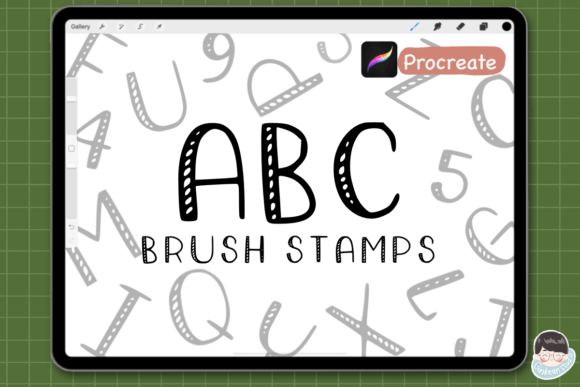
This brush set solves that dilemma. With 36 distinct stamps covering the entire alphabet (A-Z) and numbers (0-9), you gain immediate access to a cohesive style. Each stamp is crafted to mimic the texture and flow of a real brush stroke, ensuring that when you place them on your canvas, they blend seamlessly with your other digital elements. You get the warmth of hand-lettering without the frustration of correcting mistakes or redrawing letters that didn't turn out right.
Real-World Scenarios: From Social Media to Personal Planning
The versatility of these Procreate tools means they fit into a wide variety of creative workflows. Let's explore how different users leverage this kit in their daily lives.
Social Media Content Creators
For those managing Instagram accounts or TikTok channels, visual consistency is key. Imagine creating a series of quote graphics or promotional posts. Using the ABC Brush Procreate Stamps allows you to maintain a signature look across all your content. You can quickly type out captions, overlay them on photos, and add decorative elements without needing advanced graphic design software like Adobe Illustrator. The uppercase nature of the stamps gives headlines a bold, impactful presence that grabs attention in a crowded feed.
Digital Planners and Journalers
The digital planning community has exploded in recent years, with many people moving away from physical notebooks to apps like GoodNotes or Procreate. However, typing on a keyboard inside a planner often feels impersonal. By importing these letter brushes, planners can create custom headers, monthly calendars, and motivational quotes that feel truly personal. If you are designing a weekly spread, you can use the number stamps (0-9) to mark dates and the alphabet stamps to label sections like "Goals," "Habits," or "To-Do," making your digital space both functional and beautiful.
Graphic Designers and Illustrators
Even professional designers find value in having a library of custom assets. When working on book covers, album art, or branding mockups, the ability to experiment with text placement is crucial. These stamps allow for rapid prototyping. You can drag and drop letters to see how different words fit within a composition before committing to a final font choice. It serves as an excellent brainstorming tool, allowing you to visualize ideas faster than traditional methods.
Understanding What You Get in the Kit
When you download the ABC Brush Procreate Stamps, you are receiving a comprehensive resource designed for efficiency. The package includes a total of 36 brush stamps, meticulously organized to cover every character you might need for basic text creation. This includes:
- 26 Alphabet Brush Stamps: Covering A through Z in uppercase, providing a complete set for titles and headings.
- 10 Number Stamps: Including digits 0 through 9, essential for dates, pricing, lists, and data visualization.
The delivery method is designed for instant gratification. Upon purchase, you receive a zipped file containing the note file and a direct link to download the brushes via Google Drive. This ensures that you can start using the tools immediately after setting up your Procreate project. There is no waiting for shipping or dealing with physical media; it is a purely digital solution ready for your iPad.
Practical Considerations Before You Start
While these brushes are powerful, understanding their limitations and requirements will help you get the most out of them. First and foremost, compatibility is key. These stamps are specifically engineered for the Procreate app on iPad. To ensure smooth performance and accurate rendering of the textures, it is highly recommended that you use the most updated version of Procreate available. Older versions may not support the specific stamp settings or could result in display errors.
Another consideration is the workflow adjustment. Unlike a standard text layer where you can edit the spelling instantly, stamp brushes require you to place each letter individually. This means if you make a typo, you cannot simply hit backspace; you will need to erase the specific stamp and replace it. While this might sound tedious, it actually offers a unique advantage: total control over spacing and alignment. You can stretch, rotate, or skew individual letters to fit a curved path or a specific design constraint, something that standard text layers often struggle with.
Furthermore, because these are digital downloads, you should verify your storage space and ensure you have a stable internet connection to access the Google Drive link for the initial setup. Once downloaded and imported into Procreate, however, the brushes are stored locally on your device, meaning you can use them offline anywhere you take your iPad.
Unlocking Commercial Potential
One of the most significant benefits of the ABC Brush Procreate Stamps is the commercial license included with the download. For freelancers, small business owners, and independent creators, this opens up a world of possibilities. You are not limited to personal projects; you can incorporate these stamps into client work, sell designs created with them, or use them in marketing materials for your brand.
Imagine a boutique owner creating sale posters for their website, or a wedding planner designing custom invitations for clients. With the permission to use these assets commercially, you can build a portfolio of work that looks professional and polished without incurring additional licensing fees for fonts. This flexibility makes the brush pack a cost-effective investment for anyone looking to monetize their digital art skills.
Maximizing Your Creative Output
To truly master these tools, think beyond simple text. Try combining the stamps with other Procreate features. Use blending modes to integrate the letters into textured backgrounds, or apply liquify effects to distort the edges for a more abstract look. You can also change the color of the stamps mid-project to create gradients or multi-colored text effects that would be impossible with a standard font.
The beauty of the Procreate Uppercase brush stamps is that they serve as a foundation. They give you the structure you need to build upon, allowing your imagination to handle the rest. Whether you are sketching a quick concept or refining a final piece for print, having this brush set in your library ensures that your text always adds value to your artwork rather than detracting from it.
In a digital landscape where speed and quality are paramount, tools like these provide the perfect balance. They respect the artist's need for authenticity while acknowledging the practical need for efficiency. By integrating the ABC Brush Procreate Stamps into your workflow, you are not just saving time; you are elevating the overall quality of your creative output, one letter at a time.