Wildwood Procreate Brush Clipart: A Practical Guide for Digital Artists
In the crowded landscape of digital art resources, finding assets that balance aesthetic charm with technical utility can be a challenge. The Wildwood Procreate Brush Clipart collection addresses this by merging handcrafted textures with versatile vector formats. Designed to echo the spirit of the wild, this set offers a distinct alternative to generic stock imagery. For artists aged 20 to 50 who are evaluating tools for vintage-inspired projects, invitations, or poster design, understanding where this collection fits within their workflow is essential. This guide examines the features, tradeoffs, and specific use cases of the Wildwood collection to help you determine if it aligns with your creative goals.
Defining the Wildwood Aesthetic and Technical Specifications
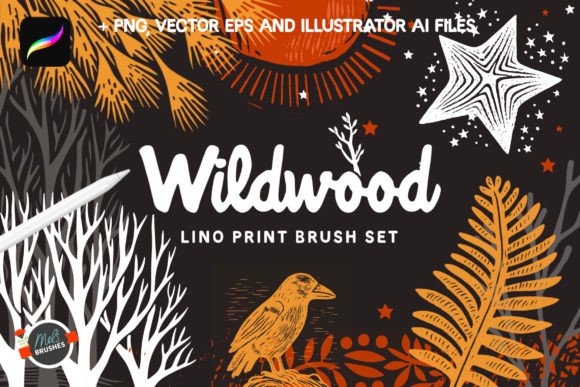
The core identity of the Wildwood Procreate Brush and Vector Clipart Collection lies in its "linocutting vintage touch." Unlike smooth, hyper-realistic vector sets often found in commercial libraries, Wildwood embraces the imperfections of traditional printmaking. The bold lines and retro feel mimic woodblock printing, providing an immediate sense of history and texture. This aesthetic is not merely superficial; it is embedded in the brush engines and vector paths, ensuring that every mushroom, branch, or frame carries the weight of a hand-carved original.
Technically, the collection is robust. It delivers high-quality graphics at 300dpi resolution, a standard critical for print media such as invitations and posters. However, what distinguishes Wildwood from many competitors is its multi-format approach. Users receive:
- Vector EPS clipart: Essential for scalability without quality loss.
- Illustrator AI files: Ideal for complex layout work in professional desktop environments.
- PNG with transparent backgrounds: Perfect for quick integration into web designs or social media content.
- Procreate Brushes: Custom brushes that replicate the linocut style directly within the iPad app.
This variety ensures that the asset is not locked into a single software ecosystem, offering flexibility that many niche collections lack.
Comparing Wildwood to Standard Stock Assets
When evaluating digital resources, it is helpful to compare them against standard alternatives. Most free or low-cost clipart libraries focus on clean, flat vectors or photorealistic elements. While these are functional, they often lack the cohesive "handmade" narrative that defines the Wildwood experience.
The Texture Factor
Standard clipart often requires manual texturing to achieve a vintage look. With Wildwood, the texture is intrinsic. If you are creating a botanical illustration that needs to feel organic rather than digitally sterile, the pre-integrated linocut style saves significant time. In contrast, using a standard vector set might require adding grain overlays or noise filters later in the process, which can sometimes result in a disjointed look.
Format Versatility vs. Specialization
Some Procreate brush packs are exclusive to the iPad environment. While excellent for sketching, they cannot be easily repurposed for print layouts in Adobe Illustrator. Conversely, some vector packs do not include corresponding brushes. The Wildwood Procreate Brush Clipart bridges this gap. It allows an artist to sketch a composition on an iPad using the custom brushes and then seamlessly transition to desktop software using the vector counterparts to finalize the piece. This hybrid capability is a significant advantage over single-format resources.
Evaluating Strengths and Tradeoffs
No resource is universally perfect for every project. To make an informed decision, one must weigh the strengths of the Wildwood collection against potential limitations based on specific project requirements.
Key Strengths
- Cohesive Design Language: With over 70 elements ranging from whimsical mushrooms to intricate branches, the collection maintains a consistent visual voice. This consistency is crucial for branding or series-based work where mismatched styles can dilute the message.
- High Resolution for Print: The 300dpi guarantee ensures that designs remain sharp when printed on paper, a common pitfall with lower-resolution digital downloads.
- Versatile Application: From framing borders to standalone focal points, the elements are designed to function in multiple roles within a layout.
Potential Tradeoffs
- Style Specificity: The strong linocut aesthetic means the assets may not suit projects requiring a modern, minimalist, or ultra-realistic look. If your brand identity relies on sleek gradients or photo-realism, this vintage style could clash.
- Learning Curve for Brushes: While the brushes are powerful, replicating the exact look of a lino cut may require some experimentation with pressure sensitivity and stroke speed compared to using a static PNG image.
- Cost vs. Volume: As a premium handcrafted set, the price point may be higher than bulk stock downloads. However, the value lies in the uniqueness and the dual format (brush + vector) rather than sheer quantity of generic items.
Ideal Use Cases and Decision Factors
Determining whether Wildwood Procreate Brush Clipart is the right choice depends largely on the nature of your project. Here are scenarios where this collection excels, alongside situations where you might consider other options.
When Wildwood Is the Right Choice
If you are designing vintage-style posters, wedding invitations, or packaging for artisanal products, this collection is highly effective. The retro vibe aligns perfectly with brands that emphasize sustainability, craftsmanship, or nostalgia. For example, a local coffee shop looking for menu illustrations featuring forest motifs would find the whimsical mushrooms and branches ideal for conveying a cozy, natural atmosphere. Similarly, illustrators working on children's books who want a tactile, storybook feel will appreciate the depth provided by the linocut style.
The inclusion of frames and borders makes it particularly useful for graphic designers creating templates. The ability to scale these vectors ensures they work equally well on a business card or a large banner.
When to Consider Alternatives
Conversely, if your project demands a futuristic, corporate, or strictly realistic aesthetic, the Wildwood collection may not be suitable. Its strength is its stylized nature; attempting to force it into a context requiring photographic realism will likely yield poor results. Additionally, if you are working exclusively in a web-only environment with strict file size constraints, the high-resolution PNGs might be larger than necessary, though optimization is always possible.
For users who need hundreds of disparate elements rather than a curated thematic set, a massive general-purpose stock library might offer more variety, albeit with less stylistic cohesion.
Practical Implementation in a Workflow
To maximize the value of the Wildwood Procreate Brush and Vector Clipart Collection, consider how it integrates into a typical design workflow. A practical approach involves using the Procreate brushes for the initial concept phase. Sketching foliage or border ideas on an iPad allows for rapid iteration and organic line work that feels human-made. Once the composition is finalized, the designer can switch to Adobe Illustrator to import the vector EPS or AI files. This ensures that the final output is crisp and editable, allowing for color adjustments or minor shape modifications without losing resolution.
This dual-stage workflow highlights the collection's versatility. It supports both the creative exploration phase and the technical execution phase, reducing the friction often encountered when switching between different types of assets.
Conclusion: Making an Informed Selection
The Wildwood Procreate Brush Clipart collection stands out as a specialized tool for artists seeking to infuse their work with a tangible, vintage connection to nature. Its combination of high-resolution vectors, custom brushes, and a distinct linocut aesthetic offers a unique solution for those tired of generic digital assets. While it may not fit every design brief—particularly those requiring modern minimalism—it is an exceptional resource for projects demanding character, texture, and a handcrafted feel.
Ultimately, the decision to use Wildwood should hinge on your specific aesthetic goals and the need for a cohesive, multi-format resource. By understanding its strengths in print readiness and stylistic consistency, you can confidently evaluate whether it serves as the missing piece in your creative toolkit.