Evaluating the Sparkling Star Stamp Brush for Procreate: A Practical Guide
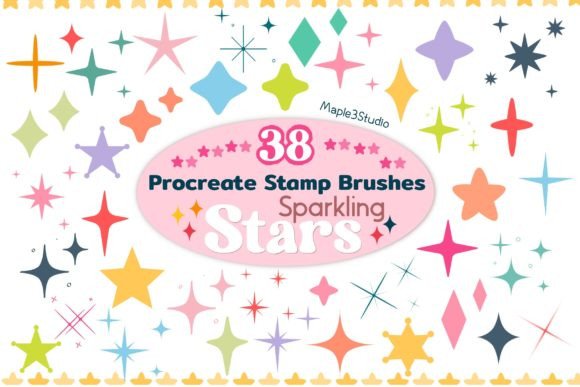
Digital illustration often relies on a balance between hand-drawn authenticity and the efficiency of digital tools. For artists working within the Procreate ecosystem, texture and detail are frequently achieved through custom brush sets. Among the various resources available, the Sparkling Star Stamp Brush for Procreate has emerged as a specific utility for adding celestial elements to artwork. This collection, comprising 38 distinct star stamp brushes, is designed to streamline the process of decorating illustrations with glitter, sparkles, and star motifs. However, before integrating this tool into a workflow, it is essential to understand its mechanics, compare it against other methods, and evaluate whether it fits specific artistic needs.
Understanding the Mechanics of Star Stamp Brushes
The core functionality of the Sparkling Star Stamp Brush for Procreate lies in its classification as a "stamp" or "pattern" brush rather than a traditional drawing brush. Unlike standard brushes that rely on pressure sensitivity to create variable line widths and strokes, stamp brushes place a pre-defined image at the point of contact. When an artist selects one of the 38 stars included in this set, each tap or drag deposits a fixed graphic element onto the canvas.
This distinction is critical for understanding the tool's application. The set includes a variety of shapes, from simple five-pointed stars to complex, multi-faceted geometric designs intended to mimic glitter. Because these are stamps, they offer consistency. If an artist needs to scatter dozens of identical stars across a background to create a night sky effect, the stamp method ensures uniformity that can be difficult to achieve by drawing each star individually. The package typically arrives as a single zip file containing the Procreate-compatible brush files, allowing for immediate importation without complex setup procedures.
Comparing Stamp Brushes vs. Custom Drawing Techniques
When evaluating the Sparkling Star Stamp Brush for Procreate, it is necessary to compare it against alternative methods of creating starry effects. The primary alternative is manual drawing using standard calligraphy or ink brushes. Manual drawing offers the highest degree of control over every curve and angle. An artist can vary the thickness of a star's points based on pressure, adjust the opacity dynamically during the stroke, and create organic, imperfect shapes that feel hand-crafted.
In contrast, the Cute Star Stamp Brush set prioritizes speed and repetition. While manual drawing is superior for unique, focal-point stars where character and variation are paramount, stamp brushes excel in volume work. For instance, if a project requires a dense field of background stars, drawing them one by one would consume significant time. The stamp approach allows an artist to rapidly populate a layer with texture. The trade-off here is rigidity; while the set offers 38 variations, the individual stars themselves do not change shape based on how hard the stylus is pressed, unless specific settings like size jitter have been pre-configured within the brush engine.
Assessing the Variety Within the 38-Brush Collection
The value proposition of the Sparkling Star Stamp Brush for Procreate is largely defined by the diversity of the included assets. With 38 different options, the set attempts to cover a broad spectrum of aesthetic requirements. Some brushes may feature soft, glowing edges suitable for dreamy or ethereal compositions, while others might offer sharp, high-contrast lines ideal for bold graphic design or cut-out style illustrations.
Artists should examine the specific styles included to determine fit. Does the set lean heavily towards "cute" aesthetics with rounded, whimsical shapes, or does it include more realistic, astronomical representations? The description suggests a focus on "glitter" and "sparkle," implying that many of the 38 brushes are likely textured to simulate light reflection. This makes them particularly useful for fashion illustration, greeting cards, or fantasy art where a magical atmosphere is required. However, if a project demands photorealistic astronomy, these stylized stamps may lack the necessary complexity, requiring the artist to seek more specialized, high-resolution texture resources instead.
Workflow Integration and Technical Considerations
Integrating the Glitter Procreate Stamps into an existing workflow is generally straightforward, provided the user is operating within the Procreate application. The format is proprietary to Procreate, meaning these files cannot be used in competing applications like Adobe Fresco or Clip Studio Paint without conversion, which is often not feasible for stamp brushes due to their complex internal settings.
Once imported via the zip file, the brushes appear in the library under a new category. Artists can then organize them further, perhaps grouping the most frequently used "Cute Star Stamp Brush" variants into a dedicated folder for quick access. A practical consideration is layer management. Because stamp brushes can easily clutter a canvas, it is advisable to use them on separate layers. This allows for non-destructive editing; if a star is misplaced, it can be erased or moved without affecting the underlying illustration. Furthermore, blending modes such as "Add," "Overlay," or "Color Dodge" can be applied to the star layer to enhance the illusion of light and sparkle, making the static images appear dynamic and luminous.
Identifying the Best Use Cases and Limitations
The Sparkling Star Stamp Brush for Procreate is best suited for specific scenarios where efficiency and decorative flair are priorities. It is an excellent choice for:
- Background Texturing: Quickly filling large areas with atmospheric depth.
- Decorative Accents: Adding finishing touches to borders, frames, or typography.
- Rapid Prototyping: Sketching out ideas involving celestial themes without committing to detailed rendering.
- Consistency Requirements: Ensuring that repeated elements look identical throughout a series of illustrations.
However, there are situations where this tool may not be the optimal choice. If an artist requires total uniqueness for every single star, or if the project involves a style that demands heavy distortion and fluid movement (such as liquid metal effects), the rigid nature of stamp brushes becomes a limitation. Additionally, because these are raster-based stamps, scaling them up significantly can result in pixelation. They are designed to be used at specific sizes relative to the canvas resolution. For projects requiring vector scalability or extreme zoom levels, a vector-based approach or manual redrawing would be more appropriate.
Making an Informed Decision
Ultimately, the decision to utilize the Sparkling Star Stamp Brush for Procreate depends on the specific goals of the artwork and the artist's personal workflow preferences. For those who value time-saving tools that provide immediate visual impact, this 38-brush collection offers a robust solution for adding sparkle and charm. It bridges the gap between tedious manual repetition and the need for high-quality decorative elements.
Conversely, artists who prioritize organic imperfection and complete control over every stroke might find the stamp format too restrictive. In such cases, these brushes could serve as a reference or a starting point, but the final execution might still require manual refinement. By understanding the strengths—speed, consistency, and variety—and the limitations—rigidity and platform exclusivity—artists can make a calculated decision on whether this resource aligns with their creative vision. Whether used for a whimsical children's book illustration or a sophisticated fashion layout, the right tool is one that enhances the creative process rather than hindering it.