Glitter Sparkle: Elevating Digital Artwork with Professional Shimmer Effects
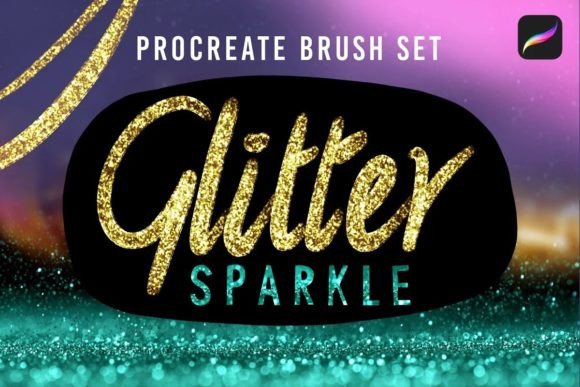
In the competitive landscape of digital illustration and graphic design, the difference between a good piece and a memorable one often lies in the finishing touches. Texture, light, and dimension are the elements that transform flat vector shapes or standard raster paintings into immersive visual experiences. The Glitter Sparkle Procreate brush set addresses this specific need by providing a curated collection of tools designed to inject enchanting shimmer and metallic shine into your workflow. For professionals ranging from freelance illustrators to marketing entrepreneurs, integrating high-quality sparkle effects is not merely about decoration; it is a strategic decision to enhance visual hierarchy and capture audience attention.
Understanding the Role of Glitter Sparkle in Your Creative Process
The Glitter Sparkle collection is more than a simple asset pack; it is a functional component of a broader artistic pipeline. In professional workflows, texture application is rarely an afterthought. It is a calculated step that occurs at various stages of project development. Whether you are conceptualizing a logo for a small business, designing social media assets for a brand campaign, or illustrating a children's book, the ability to simulate physical materials like gold leaf, crushed glass, or stardust adds a layer of realism and allure that standard brushes cannot achieve alone.
This 12-brush set is engineered to fit seamlessly into the Procreate environment, allowing artists to maintain momentum without switching applications or importing external textures. The inclusion of a bonus light flare sparkle brush further expands its utility, enabling users to create depth through lighting effects rather than just surface texture. By understanding where these tools fit within your process—be it during the initial sketch phase for mood setting or in the final rendering stage for polish—you can maximize their impact on the final deliverable.
Strategic Integration Before and During Project Execution
Effective use of the Glitter Sparkle brushes begins with planning. Before opening your canvas, consider the emotional tone of your project. Is the goal to convey luxury, magic, energy, or celebration? This decision dictates which brushes from the set will be most effective. For instance, a corporate presentation requiring a subtle touch of elegance might utilize the fine metallic dust brushes sparingly, while a fantasy game asset might demand the heavy, chaotic glitter effects found in the same pack.
During the execution phase, these brushes interact dynamically with other layers and blending modes. A common technique involves creating a base color layer and then applying the glitter effects on a separate layer set to "Overlay," "Screen," or "Color Dodge." This non-destructive workflow ensures that the underlying artwork remains editable. If the client requests a change in color palette later, you can adjust the base layer without losing the intricate sparkles. This method promotes efficiency and reduces the risk of quality control issues that often arise when effects are baked directly into the main image.
Furthermore, the organization of your brush library plays a crucial role in maintaining focus. With 12 distinct options plus the light flare tool, categorization is key. Grouping these brushes into a dedicated folder labeled "Textures & Light" allows for rapid access during the creative flow. This organizational habit prevents the frustration of searching through hundreds of default brushes when a specific type of shimmer is needed to finalize a detail.
Post-Production and Final Polish Workflows
The final stage of any digital art project is refinement, and this is where the Glitter Sparkle set truly shines. After the primary composition is complete, artists often review their work to identify areas that feel flat or lack visual interest. Applying the bonus light flare sparkle brush can introduce a sense of atmospheric depth, simulating how light interacts with particles in the air. This is particularly useful for product photography mockups, album covers, or character designs where a "glow" effect enhances the perceived value of the subject.
Consistency is vital when working on series or branding projects. Once you have determined the ideal opacity and size settings for a specific glitter effect, save these as custom presets if possible, or document them for future reference. This ensures that every asset produced under a specific brand identity maintains a uniform look. For marketers and content creators, this consistency builds brand recognition and trust. When a viewer sees a familiar style of shimmer across different platforms, it reinforces the professional quality of the work.
Practical Implementation Tips for Maximum Efficiency
To get the most out of the Glitter Sparkle Procreate brush set, users should experiment with pressure sensitivity and tilt settings. These parameters control how the brush responds to the stylus, allowing for natural variation in the density and direction of the glitter. A light touch might scatter fine specks, while firm pressure could deposit heavier clusters of metallic shine. Mastering this tactile interaction transforms the digital experience, making the application of effects feel organic rather than mechanical.
Consider the following practical approaches to integrate these tools into your routine:
- Layer Masking for Precision: Instead of painting glitter freely over an entire area, apply the brush to a new layer and use a layer mask to restrict the sparkle to specific edges or highlights. This offers greater control and keeps the file clean.
- Blending Mode Experiments: Test different blending modes to see how the glitter interacts with colors beneath it. "Soft Light" is excellent for subtle integration, while "Hard Light" creates intense, vibrant reflections suitable for bold designs.
- Opacity Adjustment: Rarely should a glitter brush be used at 100% opacity unless aiming for a solid block of texture. Lowering the opacity to 20–40% often yields a more realistic, ethereal look that mimics real-world light scattering.
- Combining with Other Assets: The Glitter Sparkle brushes work exceptionally well alongside gradient maps and noise textures. Layering a subtle grain over the glitter can break up digital perfection and add a tangible, photographic quality to the artwork.
Compatibility and Long-Term Usability
One of the significant advantages of this brush set is its compatibility with the Procreate ecosystem. As software updates roll out, maintaining backward compatibility is essential for long-term usability. The brushes are designed to function within the standard engine of the app, ensuring they remain stable across different iPad models and operating system versions. This reliability is critical for professionals who rely on their tools for daily deadlines and client deliveries.
Moreover, the versatility of the set supports a wide range of user needs. Educators can use these brushes to teach students about light theory and texture mapping. Entrepreneurs can leverage them to create eye-catching promotional materials that stand out in crowded feeds. Hobbyists find them accessible enough to learn with yet powerful enough to produce gallery-worthy results. The inclusion of the light flare brush specifically addresses the need for dynamic lighting, a skill that often requires complex node-based setups in other software but is simplified here into a single, intuitive stroke.
Optimizing Outcomes Through Workflow Discipline
While the Glitter Sparkle brushes provide the means to create stunning visuals, the outcome depends heavily on the discipline of the artist. Overuse of special effects can lead to visual clutter, distracting the viewer from the core message of the artwork. A disciplined approach involves using these tools with intention. Ask yourself: Does this addition serve the composition? Does it guide the eye to the focal point? If the answer is no, resist the urge to apply the sparkle.
Quality control also involves checking the resolution and scale of the glitter. What looks impressive on a large tablet screen may appear muddy or pixelated when exported for web use. Always preview your work at the intended output size before finalizing. Adjusting the brush size relative to the canvas dimensions ensures that the glitter particles retain their crispness and definition regardless of where the final image is displayed.
Ultimately, integrating the Glitter Sparkle Procreate brush set into your workflow is about enhancing your creative toolkit with reliable, high-performance assets. By understanding the technical aspects of layering, blending, and masking, and by approaching the application of these effects with strategic intent, you can elevate your digital art to a new level of professionalism. Whether you are polishing a personal portfolio piece or delivering a high-stakes commercial project, the ability to command light and texture sets your work apart in a visually saturated world.