Procreate Designer Makeup Palette Swatch: Elevating Digital Artistry
Digital illustration has evolved from simple sketching to a sophisticated medium where texture, lighting, and color theory play pivotal roles. For artists specializing in beauty, fashion, or character design, the ability to replicate the nuanced finish of physical cosmetics is essential. This is where the Procreate Designer Makeup Palette Swatch becomes an indispensable tool. Specifically designed for the iPad Procreate app, this digital asset bridges the gap between physical makeup artistry and digital creation, offering a curated selection of colors inspired by high-end cosmetic formulations.
The challenge many digital artists face is not just finding the right hue, but capturing the specific behavior of that hue on skin. Standard color pickers often yield flat, lifeless results that lack the depth of real pigments. Whether you are creating a portfolio piece, designing a marketing campaign for a brand, or simply experimenting with virtual looks, the limitations of default color sets can stifle creativity. The need for a resource that mimics the complexity of professional eyeshadows is significant, and a specialized swatch set addresses this directly.
The Inspiration Behind the Colors
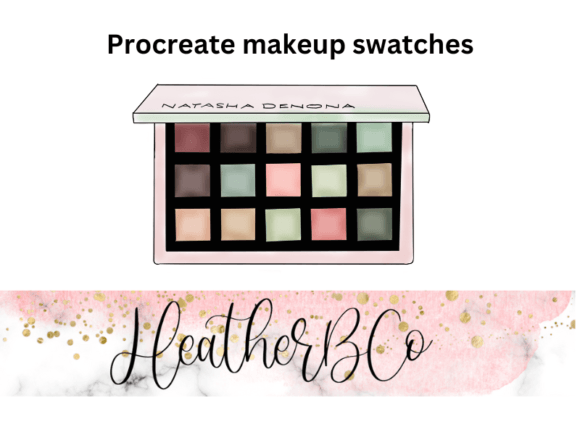
The core of this digital resource lies in its inspiration: the iconic Natasha Denona Retro Glam palette. Known for its luxurious textures and rich, vintage-inspired tones, the physical palette offers a spectrum that ranges from deep, velvety mattes to shimmering metallics. Translating these physical characteristics into a digital format requires more than just sampling the RGB values; it involves understanding how light interacts with different finishes.
This Procreate Designer Makeup Palette Swatch captures the essence of those 15 distinct shades found in the original collection. Each color has been meticulously calibrated to ensure that when applied digitally, it retains the vibrancy and saturation of the physical product. The result is a collection that feels authentic, allowing artists to work with confidence knowing their digital output will reflect the quality of premium makeup.
Overcoming Common Digital Art Challenges
Artists often struggle with several recurring issues when attempting to render realistic makeup effects:
- Color Consistency: Maintaining a cohesive look across different layers and brushes can be difficult without a pre-set harmony.
- Texture Simulation: Replicating the difference between a matte powder and a glittery foil requires specific color properties that standard palettes lack.
- Workflow Efficiency: Constantly searching for the perfect shade interrupts the creative flow and slows down the production process.
- Client Expectations: Professional clients expect deliverables that match the quality of physical samples, which generic colors often fail to achieve.
By integrating a dedicated Procreate Designer Makeup Palette Swatch into your workflow, you effectively eliminate the guesswork. The 15-color arrangement provides a balanced spectrum, ensuring you have complementary shades for blending, highlighting, and contouring without needing to manually mix colors every time.
Practical Applications and Outcomes
The versatility of this palette extends beyond simple color selection. It serves as a foundation for various artistic endeavors. For instance, beauty illustrators can use the swatches to create hyper-realistic eye makeup tutorials. The high resolution of the included files ensures that even when zoomed in, the colors remain crisp and true to form.
Fashion designers and concept artists can utilize these swatches to prototype new makeup lines or visualize characters with specific aesthetic requirements. The "Retro Glam" influence means the palette is particularly effective for vintage-inspired projects, editorial spreads, or fantasy designs requiring a touch of old-world luxury. When you apply these colors using appropriate brush settings, the outcome is a seamless blend of digital precision and organic beauty.
Furthermore, the inclusion of a PNF file (Procreate Native Format) at 300 DPI high resolution is a critical feature for professional use. This file format allows for immediate integration into the Procreate app without conversion errors. The high resolution ensures that whether you are working on a small icon or a large canvas for print, the color integrity remains intact. This technical specification is vital for users who need to export their work for commercial printing or high-definition displays.
Tailoring the Approach to Different Users
While the palette serves a universal purpose, different users will approach its implementation based on their specific goals.
The Beauty Illustrator will likely focus on layering techniques. They might use the deeper matte shades for crease definition and the shimmering tones for lid placement, utilizing the Procreate blending modes to mimic the way light catches on real eyelids. For them, the Procreate Designer Makeup Palette Swatch acts as a library of finished textures.
The Concept Artist may take a broader approach, using the palette to establish the mood of a character. A retro-themed character might rely heavily on the warm, golden tones, while a more modern interpretation could mix these with cooler accents. The fixed set of 15 colors forces a discipline in color choice, preventing the artwork from becoming muddy or chaotic.
The Educator or Content Creator benefits from the consistency the palette offers. When teaching others about color theory or makeup application, having a standardized set of colors ensures that students or viewers can follow along easily. The clear distinction between the 15 shades makes it an excellent reference tool for explaining concepts like contrast, value, and temperature.
Implementation and Workflow Integration
Getting started with this resource is straightforward. Once you import the PNF file into your Procreate app, the palette appears instantly in your color drawer. From there, you can begin experimenting with the various brushes available in the app. While the palette itself provides the color data, pairing it with high-quality makeup brushes—such as those specifically designed for soft blending or precise liner work—will maximize the potential of the swatches.
It is recommended to explore the full range of the 15 colors before settling on a combination. Often, the most striking results come from unexpected pairings, such as using a deep plum shadow against a champagne highlight. The Procreate Designer Makeup Palette Swatch encourages this kind of exploration by providing a safe, curated environment to test ideas.
For those looking to expand their toolkit further, exploring additional resources such as custom makeup brushes for Procreate can complement the palette perfectly. Brushes that simulate powder application, cream textures, or liquid liners will interact uniquely with these specific color profiles, enhancing the realism of your final piece.
Final Considerations for Success
Ultimately, the goal of using a specialized digital palette is to enhance the artist's vision, not restrict it. The Procreate Designer Makeup Palette Swatch inspired by the Natasha Denona Retro Glam collection offers a robust starting point. It solves the problem of color inconsistency and provides a professional-grade foundation for beauty art.
Whether you are refining your personal style, fulfilling a client commission, or building a portfolio, having access to high-resolution, designer-inspired colors makes a tangible difference in the quality of your work. By leveraging this tool alongside your existing skills and hardware, you can produce digital makeup art that rivals the best physical photography. As you continue to develop your craft, remember that the right tools can transform a good idea into a masterpiece.