Sweet Savory Procreate Brushpack
Digital art often struggles to bridge the gap between pixel-perfect precision and the organic unpredictability of traditional media. The Sweet Savory Procreate Brushpack was created specifically to close that divide. It is not merely a collection of digital stamps; it is a toolkit designed for creators who crave the tactile sensation of paint on canvas without leaving their iPad. With a focus on texture, flow, and the nuanced behavior of real bristles, this set offers a rich, painterly experience that feels grounded and authentic.
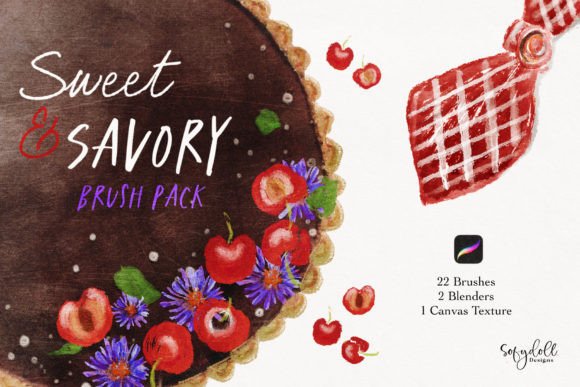
For artists, designers, and visual storytellers, the right tools can dictate the rhythm of a project. This brushset consists of 22 distinct texture brushes, 2 specialized blenders, and a dedicated textured effect canvas. Together, these elements form a cohesive system that encourages exploration while maintaining professional control. Whether you are illustrating a children's book, designing marketing assets, or simply sketching ideas for a new venture, the Sweet Savory collection provides the foundation for work that breathes.
The Anatomy of a Traditional Feel
What sets the Sweet Savory Procreate Brushpack apart is its commitment to mimicking the physical properties of traditional painting. Many digital brushes rely on simple opacity changes or static patterns, which can result in a flat, airbrushed look. In contrast, the 22 texture brushes in this pack are engineered to respond to pressure, tilt, and speed, much like a loaded oil brush or a dry watercolor stick.
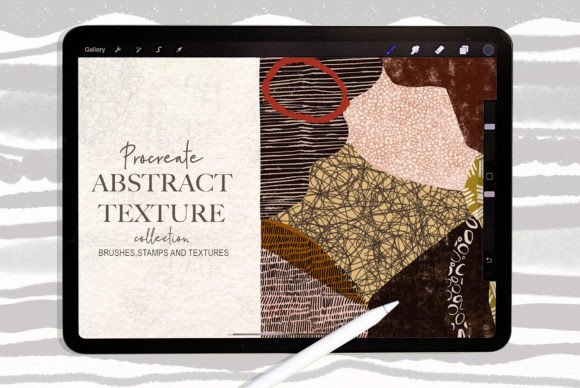
When you apply pressure with an Apple Pencil, the brush load increases, depositing more pigment. As you lift the stylus, the stroke naturally tapers, revealing the underlying canvas texture. This dynamic interaction allows for a wide range of marks, from thick, impasto-like daubs to delicate, scratchy lines. The inclusion of a textured effect canvas further enhances this realism. By painting over a surface that mimics the tooth of paper or linen, the digital strokes catch and break in ways that feel genuinely analog.
This attention to detail is crucial for creators aiming for a specific aesthetic. If your goal is to produce artwork that looks hand-painted rather than digitally rendered, the Sweet Savory brushes provide the necessary grit and variation. They eliminate the sterile "vector" look, replacing it with the warmth and imperfection that audiences find engaging and human.
Mastering the Blender Brushes
While texture defines the character of a piece, blending defines its depth. The two blender brushes included in the Sweet Savory set are essential for smoothing transitions and unifying color layers. Unlike standard smudge tools that often muddy colors or create unnatural halos, these blenders interact with the existing texture of the stroke.
They allow you to soften edges without losing the grain of the canvas. This is particularly useful when rendering skin tones, atmospheric backgrounds, or soft fabrics. By using the blenders sparingly, you can maintain the structural integrity of your initial marks while adding volume and dimension. For instance, after laying down a base layer of color with one of the texture brushes, a gentle pass with a blender can merge the pigment into the shadows, creating a seamless gradient that still retains a painterly quality.
Creative Applications Across Industries
The versatility of the Sweet Savory Procreate Brushpack extends far beyond fine art illustration. Its practical design makes it a valuable asset for a wide range of professionals who need high-quality visuals quickly and effectively.
- Freelance Illustrators: Use the varied textures to create unique character designs or editorial illustrations. The ability to switch between rough, expressive strokes and smooth blends allows for rapid iteration during client meetings.
- Marketing Designers: Incorporate hand-painted elements into social media graphics or website headers. A subtle background texture applied with the Sweet Savory brushes can make a corporate brand feel more approachable and creative.
- Educators and Content Creators: Create engaging visual aids for tutorials or blog posts. Hand-drawn diagrams and infographics made with these brushes stand out against the sea of generic stock photography, increasing viewer retention.
- Hobbyists and Journalers: Enhance digital bullet journals or travel logs. The textured effects add a sense of nostalgia and personal touch to daily entries, making them feel like curated scrapbooks.
Adapting to Different Platforms
One of the challenges in digital creation is ensuring that artwork translates well across different formats. The Sweet Savory Procreate Brushpack is designed with scalability in mind. Because the brushes rely on vector-friendly stroke dynamics rather than fixed-resolution stamps, they scale cleanly for both large-format prints and small mobile screens.
For social media, where attention spans are short, the bold, textural strokes can create eye-catching thumbnails and story highlights. The inherent contrast in the brushwork ensures that details remain visible even when compressed by algorithms. Conversely, for print projects like posters or packaging, the depth provided by the layered textures adds a premium feel that elevates the perceived value of the product.
Workflow Strategies for Consistency
To get the most out of the Sweet Savory Procreate Brushpack, it is helpful to establish a consistent workflow. While experimentation is encouraged, having a structured approach ensures that your results remain professional and audience-friendly.
- Start with the Canvas Texture: Always begin by applying the included textured effect canvas as your base layer. This ensures that every subsequent stroke interacts with the same surface grain, maintaining visual cohesion throughout the piece.
- Layer Your Textures: Avoid relying on a single brush for the entire image. Use the 22 texture brushes to build up complexity. Start with broad, loose strokes for the composition, then move to finer, more detailed brushes for accents and highlights.
- Control Opacity and Flow: Adjust the brush settings to match your desired intensity. Lower opacity settings allow for translucent washes similar to watercolor, while higher flow creates opaque, solid coverage akin to acrylics.
- Utilize Blending Strategically: Save the blender brushes for the final stages of your workflow. Over-blending too early can flatten your image and remove the desirable texture built up in earlier layers.
Consistency also comes from understanding your audience. If you are creating content for a minimalist tech brand, use the brushes subtly to add just enough warmth without overwhelming the clean design. If your audience expects vibrant, chaotic energy, lean into the rougher, more aggressive textures available in the set. The Sweet Savory Procreate Brushpack is flexible enough to adapt to these varying needs without requiring a complete overhaul of your style.
Encouraging Originality Through Tools
Tools should never limit creativity; they should expand it. The Sweet Savory Brushpack is designed to be a starting point, not a finish line. While the brushes provide a traditional feel, the way you combine them is entirely up to you. Try mixing the texture brushes with other Procreate features, such as the Liquify tool or photo filters, to create hybrid styles that are uniquely yours.
Experiment with layer modes. Placing a textured stroke on a "Multiply" layer can deepen shadows dramatically, while a "Screen" mode can introduce luminous highlights. These techniques, combined with the natural variation of the Sweet Savory brushes, open up endless possibilities for original expression. Whether you are a seasoned professional looking to refine your process or a beginner eager to explore digital painting, this set offers a reliable, inspiring path forward. It bridges the gap between the comfort of tradition and the efficiency of modern technology, empowering you to create work that resonates.