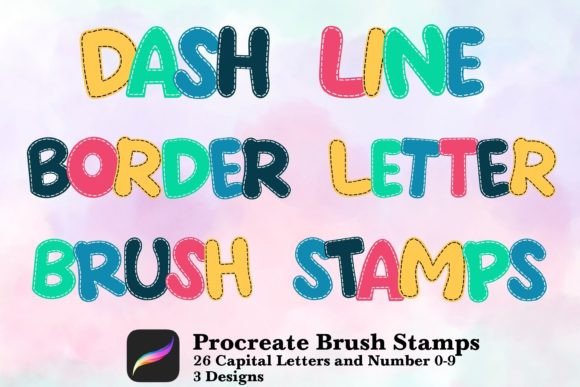
Unlock Creative Freedom with the Alphabet Number Brush Stamp Procreate Set
In the rapidly evolving world of digital art, efficiency and versatility are often the difference between a good design and a great one. For iPad artists, planners, and social media creators, the Alphabet Number Brush Stamp Procreate set has emerged as an essential tool for streamlining workflows without sacrificing artistic flair. This comprehensive brush collection is designed to bridge the gap between hand-lettered aesthetics and the precision required for modern digital projects. Whether you are crafting intricate scrapbook layouts, designing eye-catching Instagram posts, or organizing your life through digital planning, this resource offers a seamless way to add text and decorative elements instantly.
Why Digital Artists Need Custom Stamp Brushes
One of the most time-consuming aspects of digital illustration is creating consistent typography from scratch. While standard fonts offer uniformity, they often lack the organic, hand-drawn charm that makes personal branding feel authentic. The Alphabet Number Brush Stamp Procreate solution addresses this by providing pre-made stamps that mimic the look of hand-painted letters and numbers. Unlike typing text into a document editor, these brushes allow you to place characters directly onto your canvas as part of the artwork itself. This means every letter can be resized, rotated, colored, and textured just like any other brush stroke, giving you total control over the final composition.
The practical application of these stamps extends far beyond simple text entry. They are particularly valuable for artists who need to maintain a cohesive visual style across multiple platforms. For instance, a content creator might use the same brush set to create a story highlight cover, a blog header, and a physical planner page, ensuring brand consistency effortlessly. The ability to treat text as a graphical element rather than a rigid layer opens up a world of creative possibilities, allowing for overlapping strokes, partial visibility, and unique blending modes that standard text tools cannot achieve.
A Comprehensive Toolkit: What's Inside the Collection
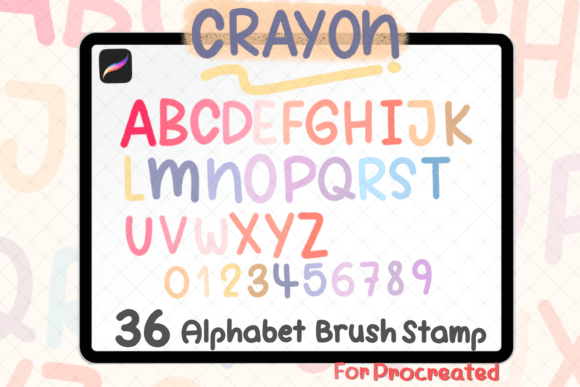
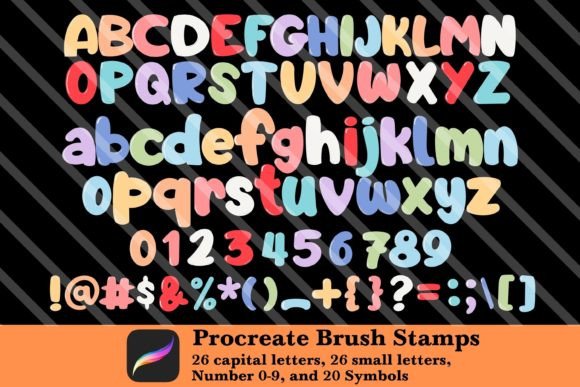
The true power of this specific brush set lies in its completeness. Upon downloading the single zipped file, users gain access to a vast array of tools tailored for diverse project needs. The core of the collection includes 26 capital letters and 26 small letters, covering the entire alphabet with a distinct, artistic flair. This ensures that no matter what word you need to spell out, you have the perfect character ready at your fingertips.
Beyond the alphabet, the set includes numbers 0-9, which are indispensable for dates, pricing, countdowns, and lists. In the realm of digital planning, having stylized numbers is crucial for marking appointments, tracking habits, or creating monthly calendars that look professional yet personalized. Additionally, the inclusion of 20 symbols adds a layer of detail that can transform a simple layout into a dynamic piece of art. These symbols can range from punctuation marks to decorative icons, providing the finishing touches needed to elevate your designs.
Perhaps the most delightful surprise within the package is the bonus content: free flowers and butterfly brush stamps. These decorative elements are perfectly matched to the typography, allowing you to create harmonious compositions where text and imagery blend seamlessly. Imagine writing a journal entry and surrounding it with delicate floral accents, or adding a whimsical butterfly next to a number on a birthday card. These extras turn a functional toolset into a complete creative suite, saving you from searching for separate assets that might not match your aesthetic.
Seamless Integration into Modern Workflows
Adopting the Alphabet Number Brush Stamp Procreate set into your daily routine is incredibly straightforward, making it accessible even for beginners. The process begins with opening your iPad and unzipping the downloaded file. Once extracted, importing the brush set is automatic; simply open Procreate, navigate to your brush library, and import the file. Within moments, the new collection appears in your menu, ready to be used immediately.
Once installed, the workflow becomes intuitive. To use a stamp, you simply select the desired brush from the collection and tap the screen. Each tap places a clean, crisp instance of the letter, number, or symbol. One of the most significant advantages of this method is the flexibility it offers post-placement. Because these are brushes and not fixed text layers, you can resize them using the two-finger pinch gesture, rotate them to fit tight spaces, or change their color instantly using the Color Drop feature. You can also adjust the opacity to create faded effects or layer multiple stamps to build depth and texture.
This level of customization is particularly beneficial for Instagram posts and social media graphics. Platforms demand high engagement, and unique visuals stand out in crowded feeds. By using these stamps, creators can produce original graphics that don't rely on generic templates. You can mix different sizes of letters to create hierarchy, overlap symbols for a collage effect, or use the flower and butterfly stamps to frame your message. The result is a polished, professional look that feels entirely handmade.
Ideal Applications for Planners and Scrapbookers
Digital planning and scrapbooking have seen a surge in popularity, driven by the desire to preserve memories and organize lives in a visually appealing way. The Alphabet Number Brush Stamp Procreate set is specifically engineered to meet the demands of these hobbies. For digital planners, the ability to quickly stamp dates, titles, and bullet points saves hours of manual drawing. Instead of spending twenty minutes handwriting a weekly schedule, you can assemble the layout in minutes while maintaining a beautiful, hand-lettered appearance.
Scrapbookers benefit equally from this resource. Traditional scrapbooking involves cutting out paper letters and arranging them physically, which can be messy and time-consuming. With these digital stamps, the process is cleaner and more forgiving. If a letter is placed incorrectly, it can be erased and redone instantly. The inclusion of symbols and nature-themed bonuses like butterflies allows scrapbookers to tell richer stories around their photos and journal entries. The tactile feel of the brush strokes mimics real ink and paint, preserving the nostalgic charm of analog scrapbooking while offering the convenience of digital editing.
Technical Considerations and Best Practices
While the installation and usage are user-friendly, there are a few technical considerations to keep in mind to get the most out of your purchase. First, ensure that you are using a compatible version of Procreate on your iPad. The brush files are optimized for this specific app and will not function in other drawing software. Second, remember that once imported, these brushes become part of your permanent library unless manually deleted, so they are available for future projects without needing to re-download.
It is also important to respect the licensing terms associated with the set. The product is intended for personal use and creative projects, but it should not be shared or resold. Distributing the zip file to others or selling the brushes as your own violates the creator's rights and undermines the community of digital artists. However, you are free to use the brushes to create your own graphics, sell those finished designs (such as custom invitations or planner pages), and share your work on social media to showcase your skills.
To maximize creativity, experiment with the settings. Try changing the wetness or flow of the brush to see how it interacts with different backgrounds. Use the "QuickShape" feature in Procreate if you want to align your stamped letters perfectly before committing them to the canvas. The versatility of the Alphabet Number Brush Stamp Procreate set lies not just in the assets themselves, but in how you manipulate them to suit your unique vision. Whether you are a seasoned graphic designer or a hobbyist looking to spice up your Sunday scaries, this toolset provides the foundation for endless creative expression.