Basic Shape Stamp Brush for Procreate
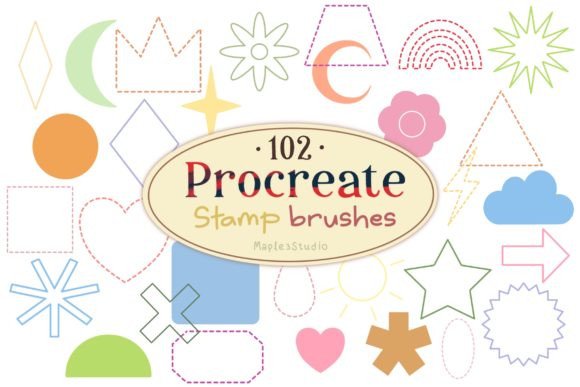
Digital art often demands a balance between fluid expression and precise structure. While the organic flow of a watercolor brush or the texture of a charcoal stroke brings life to an illustration, there are moments when you need absolute consistency. This is where the Basic Shape Stamp Brush for Procreate becomes an indispensable tool in your digital kit. It bridges the gap between freehand drawing and rigid vector design, offering a collection of 102 distinct stamp brushes that allow you to populate your canvas with perfect geometry instantly.
This specific brush set is not just a random assortment of dots and lines; it is a curated library designed to streamline your workflow. Whether you are creating intricate patterns, designing social media graphics, or adding subtle texture to a background, having immediate access to solid, outlined, and dashed shapes can transform how you approach composition. The ability to place a perfect circle, square, or star with a single tap saves time and ensures visual harmony across your project.
The Anatomy of the 102-Brush Collection
To truly leverage this resource, it helps to understand the internal logic of the set. The 102 Basic shape stamp brushes are divided into three distinct categories, each serving a unique function in the creative process. By mastering these variations, you can create depth, hierarchy, and rhythm in your work without needing to manually draw every element.
Solid Shape Brushes: Foundation and Weight
The first third of the collection consists of 34 solid shape brushes. These are filled forms ranging from simple circles and squares to more complex polygons and stars. In design theory, solid shapes carry significant visual weight. They act as anchors within a composition, drawing the viewer's eye immediately.
For illustrators, these solid stamps are excellent for creating repetitive textures or backgrounds. Imagine a patterned wallpaper design where hundreds of small, identical hexagons tile across a page. Drawing them by hand would be tedious and prone to error. With the solid shape brushes, you can drag, drop, and resize them effortlessly. Designers also use these for iconography, ensuring that every dot or block in a UI design maintains the exact same density and opacity.
Outlined Shape Brushes: Definition and Structure
The second category features 34 out-lined shape brushes. These tools provide the perimeter of a shape without the fill, offering a sense of lightness and structure. Outlined shapes are particularly useful when you want to suggest form without overwhelming the composition with heavy ink.
These brushes are ideal for technical illustrations, architectural sketches, or fashion flats where precision is paramount. An outlined circle can represent a lens, a wheel, or a frame, while maintaining transparency underneath. For marketers creating infographics, outlined shapes help categorize data points without obscuring the text or charts behind them. They allow for layering effects where one shape sits cleanly on top of another, creating a clean, modern aesthetic that feels organized and professional.
Dashed Line Shape Brushes: Movement and Guidance
The final set includes 34 dashed line shape brushes. These introduce a dynamic quality to static images. A dashed line implies motion, direction, or a temporary state. Unlike continuous lines, which feel permanent and solid, dashed shapes suggest a path, a connection, or a construction phase.
In storytelling and comic creation, these brushes are fantastic for indicating movement trails, thought bubbles, or magical effects. For educators creating worksheets or presentations, dashed outlines serve as excellent guides for students to trace or fill in. In web design mockups, they can represent "placeholder" areas or interactive zones. The rhythmic break in the line adds a visual beat that keeps the eye moving across the artwork, preventing the design from feeling too static.
Practical Applications Across Industries
The versatility of the Basic Shape Stamp Brush for Procreate extends far beyond personal hobbyist projects. Professionals across various sectors can adapt these tools to meet specific goals and audience needs.
- Graphic Designers: Use the solid and outlined sets to build custom pattern libraries for branding materials. Consistency is key in branding, and these stamps ensure that every logo variation or packaging element aligns perfectly.
- Social Media Managers: Create engaging story templates quickly. Dashed shapes can highlight key text, while solid shapes can act as bullet points or decorative accents that stand out against busy backgrounds.
- Educators and Content Creators: Develop clear, visually appealing diagrams for tutorials. Using outlined shapes for containers and dashed lines for connections makes complex information easier to digest for learners.
- Freelance Illustrators: Speed up the rendering process for children's books or educational posters. Instead of spending hours drawing individual stars or clouds, stamp them in varying sizes and opacities to create instant atmosphere.
Mastering Composition and Consistency
While the ease of using stamp brushes is a major benefit, it requires discipline to avoid clutter. Because these shapes are so easy to place, there is a temptation to overuse them. To keep your results clear and effective, focus on the principles of spacing and scale.
When decorating your artwork, vary the size of your stamps significantly. A field of identical-sized circles looks like a mistake; a field of circles ranging from tiny specks to large focal points creates depth and interest. Utilize the Procreate interface to adjust the brush size slider dynamically as you work. Furthermore, consider opacity. Lowering the opacity of a solid shape can turn it into a soft wash, allowing underlying layers to peek through, which adds sophistication to your piece.
Organization is also crucial. Since this set contains 102 different options, keeping your brush library tidy will save you frustration. Consider grouping these brushes into a dedicated folder named "Geometric Stamps" within your Procreate app. You might even sub-group them by type (Solid, Outline, Dashed) to find exactly what you need during a fast-paced creative session.
Optimizing Your Workflow
Remember that these brushes are designed exclusively for the Procreate application. This means they are optimized for the iPad's touch interface and Apple Pencil pressure sensitivity. While they function as stamps, you can still utilize some pressure settings if configured correctly, though their primary strength lies in their uniformity.
To get the most out of the Basic Shape Stamp Brush for Procreate, experiment with blending modes. Changing a solid shape from "Normal" to "Multiply" allows it to interact with darker tones beneath it, while switching to "Overlay" can brighten the area around the shape. These small adjustments can make a stamped element feel integrated into the painting rather than simply pasted on top.
Creativity often thrives within constraints. By limiting yourself to a defined palette of geometric forms, you force yourself to solve problems through arrangement and color rather than complex drawing techniques. This approach can lead to bold, graphic styles that resonate well in today's digital-first visual landscape. Whether you are a seasoned professional looking to refine your toolkit or a beginner eager to explore digital media, these 102 brushes offer a robust foundation for structured creativity.
Ultimately, the goal is to have fun with these tools. Let the solid shapes ground your work, let the outlines define your structure, and let the dashed lines add a playful rhythm. With practice, you will find that these basic forms become the building blocks for something extraordinary.