Detailed Peony Stamps Procreate 2: A Practical Evaluation
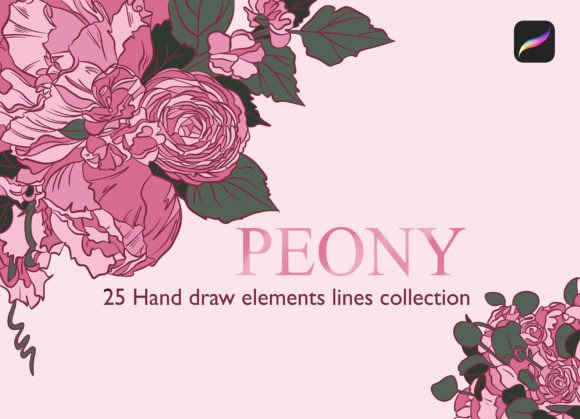
Digital illustration tools have evolved significantly, offering artists a wide array of resources to streamline their creative processes. Among these resources, Detailed Peony Stamps Procreate 2 stands out as a specialized asset designed for users of the iPad and Procreate application. This collection consists of 25 hand-drawn line elements that function as stencil brushes. Unlike standard brushes that rely on texture or pressure sensitivity alone, these tools allow users to stamp intricate peony motifs instantly onto their canvas. For digital artists, planners, and designers, understanding the utility, installation requirements, and appropriate use cases of this brush set is essential before integrating it into a workflow.
Understanding the Product and Its Functionality
The core value proposition of Detailed Peony Stamps Procreate 2 lies in its efficiency and aesthetic consistency. The set contains 25 distinct line-art elements, ranging from full blooms to individual petals and buds. These are not merely images; they are configured as brushes within the Procreate ecosystem. When selected, they act as stamps, allowing the artist to place complex floral details with a single tap or drag. This functionality is particularly useful for creating repetitive patterns, filling negative space, or adding decorative borders without the time-consuming process of drawing each element from scratch.
These brushes are formatted specifically for the modern Procreate environment. They utilize the new .brushset file format, which consolidates multiple brush files into a single package. This format ensures that all 25 elements are installed simultaneously, maintaining organization within the user's library. However, this convenience comes with specific technical prerequisites. To utilize this resource effectively, the user must possess an iPad running the Procreate app, version 4.1 or higher. Older versions of the software will not recognize the .brushset extension, rendering the file incompatible.
Installation and Technical Workflow
Integrating Detailed Peony Stamps Procreate 2 into a project requires a straightforward but precise transfer process. Since the files are typically purchased or downloaded on a desktop computer, they must be moved to the iPad before they can be used. There are two primary methods for this transfer, each with its own advantages depending on the user's hardware setup.
Method 1: Cloud Storage Transfer
For most users, cloud storage services like Dropbox offer a reliable solution. The process involves:
- Transferring the final
.brushsetfile from the computer to a designated folder within the Dropbox app. - Opening the Dropbox app on the iPad and navigating to the specific subfolder where the file was saved.
- Tapping the brush set file to reveal options, then selecting the ellipsis icon (...) and choosing "Export."
- Selecting "Open in..." and tapping "Copy to Procreate."
Once completed, opening Procreate will reveal the new brush set at the top of the brush library, ready for immediate use.
Method 2: AirDrop (Mac Users)
Users operating a Mac with macOS 10.11 or higher can utilize AirDrop for a more seamless experience. This method eliminates the need for intermediate cloud folders. By selecting the brush set file on the Mac and using AirDrop to send it directly to the iPad, the file is transferred instantly. Upon accepting the file on the iPad, the user can immediately choose to open it with Procreate, installing the set in a single step.
Evaluating Benefits and Tradeoffs
When considering whether Detailed Peony Stamps Procreate 2 aligns with your artistic goals, it is important to weigh the benefits against potential limitations. The primary advantage is speed. Creating hand-drawn floral elements from scratch requires significant time and skill. With these stamps, an artist can achieve a polished, botanical look in a fraction of the time. This is particularly beneficial for commercial projects with tight deadlines, such as creating templates for planners, designing social media graphics, or producing bulk merchandise designs.
Furthermore, the hand-drawn nature of the lines adds a human touch that vector shapes often lack. The imperfections and variations in line weight contribute to an organic feel, making the artwork appear less mechanical. This aesthetic is highly valued in the planner community and among scrapbookers who prioritize a personal, artisanal style.
However, there are tradeoffs to consider. Because these are pre-made stamps, every user employing this set will have access to the same 25 elements. If originality is the paramount concern, relying heavily on shared assets may result in work that looks similar to other creators' outputs. Additionally, while the brushes are versatile, they are fixed in their design. An artist cannot easily alter the fundamental structure of a petal or bloom without manually redrawing it over the stamp, which negates some of the time-saving benefits.
Ideal Use Cases and Alternatives
Detailed Peony Stamps Procreate 2 is a strong fit for specific scenarios. It excels in situations requiring rapid iteration and consistent styling. For example, if you are designing a monthly planner page and need to add seasonal floral accents to the corners, these brushes provide an instant solution. Similarly, artists creating watercolor-style backgrounds can use these line stamps to overlay definition and structure quickly. The tool is also suitable for beginners who wish to incorporate complex floral elements into their work without mastering advanced botanical illustration techniques.
Conversely, there are situations where alternatives may be worth considering. If the project demands unique, one-of-a-kind illustrations where no two elements should ever match, drawing from scratch or commissioning custom art might be preferable. Furthermore, if the target audience prefers photorealistic imagery rather than stylized line art, these stamps may not meet the visual requirements. In cases where the artwork needs to be scaled infinitely without loss of quality, vector-based software like Adobe Illustrator would be a more appropriate choice, as raster-based Procreate brushes have resolution limits based on the canvas size.
Decision-Making Insights
Before acquiring or utilizing Detailed Peony Stamps Procreate 2, prospective users should assess their current workflow and project requirements. Ask yourself if the time saved by using stamps outweighs the desire for total customization. Consider the frequency with which you create floral content; if peonies are a recurring theme in your work, the investment in this brush set is likely justified. However, if your style varies widely across different projects, a broader, more general-purpose brush pack might offer better long-term value.
Additionally, ensure your technical environment supports the file format. Verify that your Procreate app is updated to version 4.1 or higher and that you have a reliable method for transferring files to your iPad. Understanding these logistical steps beforehand prevents frustration during the creative process. Ultimately, Detailed Peony Stamps Procreate 2 serves as a powerful auxiliary tool for enhancing digital art, provided it is used intentionally within the context of the artist's broader vision.