Mid Century Illustration for Procreate: A Practical Evaluation
The digital art landscape offers a vast array of tools designed to replicate traditional media, yet few styles command as much specific attention as the mid-century aesthetic. For artists working within the Apple iPad ecosystem, Mid Century Illustration for Procreate represents a specialized resource aimed at capturing the distinct visual language of the 1950s and 60s. This article evaluates the utility, functionality, and appropriate use cases for this specific brush pack, helping creators determine if it aligns with their workflow and artistic goals.
Understanding the Mid Century Aesthetic in Digital Form
Mid-century illustration is characterized by bold geometric shapes, limited color palettes, heavy outlines, and a sense of playful optimism. When translating this style into a digital environment like Procreate, the challenge lies in mimicking the imperfections and texture of hand-drawn ink and paint without losing the precision that digital tools offer. The Mid Century Illustration for Procreate brush pack addresses this by providing a curated set of twelve individual digital brushes. These tools are not merely generic strokes; they are engineered to simulate the specific behaviors of inkers, sketchers, texturized paints, and color washes typical of the era.
The core value of this collection lies in its versatility. Unlike a single-brush preset, this pack allows users to mix and match components across various projects. Whether an artist is designing a retro poster, creating character illustrations, or developing packaging concepts, the ability to layer different brush types—such as combining a rough sketcher with a smooth inker—facilitates a more authentic vintage look. The inclusion of blend mode capabilities further enhances this, allowing for complex interactions between layers that mimic traditional wet-on-wet painting techniques.
Key Functionalities and Workflow Integration
Evaluating a digital asset requires understanding how it integrates into an existing workflow. The Mid Century Illustration for Procreate pack is designed with flexibility in mind, addressing common limitations found in rigid brush sets. One significant feature is the scalability of the brushes. Users can resize these tools using the standard brush resize tool within Procreate or utilize the move and resize tool for precise adjustments. This ensures that whether an artist is working on fine details or broad background elements, the brush stroke remains consistent with the intended style.
Furthermore, control over opacity and blend modes is critical for achieving depth. The pack allows the strength of the blend ink charge to be altered via the opacity slider. This granular control enables artists to build up tones gradually or create stark contrasts, both of which are hallmarks of mid-century design. By leveraging blend modes, users can achieve effects such as screen blending for light overlays or multiply for shadowing, all while maintaining the textured integrity of the original brush design. The twelve included brushes cover the spectrum from initial concept sketches to final inked lines and colored fills, reducing the need to switch between disparate third-party assets.
Benefits and Strategic Advantages
For professionals and hobbyists alike, the primary benefit of utilizing a dedicated Mid Century Illustration for Procreate set is time efficiency. Creating custom brushes that accurately replicate vintage textures and ink flows can be a labor-intensive process. By adopting a pre-configured pack, artists can bypass the technical setup phase and focus immediately on composition and creativity. The cohesive nature of the twelve brushes ensures stylistic consistency throughout a project, which is often difficult to maintain when piecing together random free brushes from various sources.
Additionally, the ability to mix and match brushes supports iterative design processes. An illustrator might start with a loose sketcher brush to establish the layout, then refine the edges with an inker, and finally apply color using the texturized paint brushes. This workflow mirrors traditional analog methods, providing a familiar tactile experience even on a glass tablet. The inclusion of blend modes also opens up possibilities for experimental layering, allowing for unique color interactions that define the vibrant yet muted palette of the mid-century period.
Tradeoffs and Considerations
While the brush pack offers significant advantages, there are tradeoffs to consider before adoption. The most notable limitation is the inherent specialization of the tools. These brushes are optimized specifically for the mid-century style. While they can be used for other purposes, they may lack the versatility required for hyper-realism, watercolor realism, or modern vector-style illustration. Artists who frequently switch between vastly different genres might find the learning curve of switching brush sets to be a minor disruption.
Another consideration is the reliance on user skill. While the brushes provide the necessary texture and flow, they do not dictate artistic quality. Achieving a convincing mid-century look still requires an understanding of the underlying design principles, such as color theory and composition. The tools are enablers, not magic solutions. Furthermore, because the brushes rely on Procreate's engine, their performance is tied to the device's processing power and the complexity of the canvas. Heavy use of texture brushes combined with high-resolution canvases may impact performance on older iPad models.
Situations Where This Pack is a Strong Fit
The Mid Century Illustration for Procreate pack is an ideal choice for several specific scenarios. It is particularly well-suited for graphic designers creating branding materials, logos, or marketing collateral that require a retro feel. The consistent line weight and texture provided by the inkers and sketchers ensure that these commercial assets maintain a professional, cohesive appearance.
It is also a strong fit for book illustrators and comic artists working on stories set in the past or those aiming for a nostalgic tone. The ability to quickly iterate on character designs using the sketcher and inker combination accelerates the production pipeline. Additionally, educators teaching illustration history or technique may find these brushes useful for demonstrating how digital tools can emulate historical art forms. Finally, hobbyists looking to explore a new style without investing months in brush creation will find this pack lowers the barrier to entry significantly.
When Alternatives May Be Worth Considering
Despite its strengths, there are situations where alternatives might be more appropriate. If a project demands a highly realistic rendering of mid-century photographs rather than stylized illustration, photo-manipulation tools or photorealistic brushes would be superior. Similarly, artists working primarily in vector-based software like Adobe Illustrator may find that raster-based Procreate brushes do not integrate well into their final workflow, necessitating a conversion process that could degrade image quality.
Furthermore, if an artist has already developed a personal library of custom brushes that suit their specific interpretation of the mid-century style, purchasing or downloading this pack may offer diminishing returns. Custom brushes allow for a level of personalization that pre-made packs cannot match. In cases where budget is a strict constraint, exploring free community resources or utilizing Procreate's native brushes with adjusted settings might suffice for basic needs, although the texture fidelity will likely be lower.
Practical Decision-Making Insights
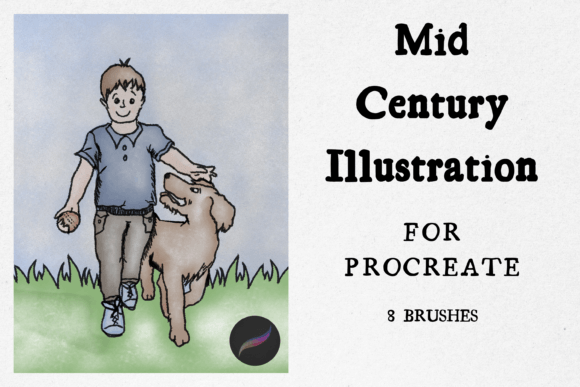
Determining whether to incorporate Mid Century Illustration for Procreate into your toolkit requires a clear assessment of your current project needs and long-term artistic direction. Begin by reviewing the listing pictures to verify that the specific textures and stroke behaviors match your vision. Pay close attention to the variety of the twelve included brushes; ensure there is a balance between line work and fill tools that suits your typical workflow.
Consider testing the brushes on a small scale before committing to a large project. Create a test file to experiment with resizing, opacity sliders, and blend modes. Observe how the ink charge behaves under different pressures and speeds. This practical trial will reveal whether the brushes feel intuitive or if they require significant adjustment to fit your hand. Ultimately, the decision should hinge on whether the pack streamlines your creative process and helps you achieve the desired vintage aesthetic more effectively than your current tools. If the answer is yes, it serves as a valuable asset in your digital art arsenal.