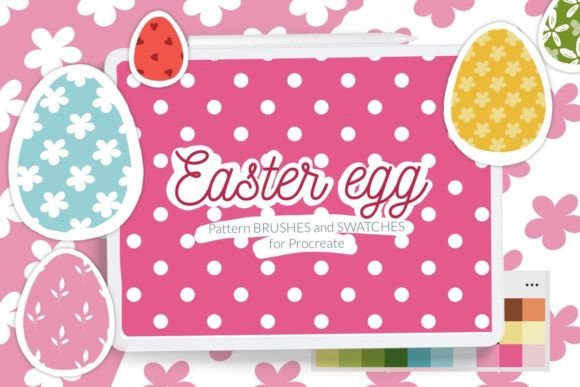
Easter Egg Pattern Brush for Procreate: Elevate Your Spring Digital Art
Creating digital art that captures the whimsy and vibrancy of spring often requires more than just a steady hand; it demands the right tools to streamline your creative process. For iPad artists using Procreate, the Easter Egg Pattern Brush for Procreate offers a sophisticated solution for adding intricate details without the tedious task of drawing every element from scratch. Whether you are designing greeting cards, illustrating storybooks, or creating social media graphics, having access to high-quality seamless patterns can transform a simple sketch into a polished masterpiece.
Understanding the Value of Seamless Pattern Brushes
The core challenge many digital artists face when working on seasonal projects is maintaining consistency while achieving variety. Drawing individual flowers, leaves, hearts, or dots repeatedly can be time-consuming and may result in slight inconsistencies that break the visual flow of a piece. This is where the Easter Egg Pattern Brush for Procreate becomes an indispensable asset. Unlike standard brushes that leave a single stroke mark, pattern brushes repeat a specific design seamlessly as you drag across the canvas. This allows for the creation of complex textures and backgrounds with a single swipe.
This specific brush set is designed to address the unique aesthetic needs of spring and Easter-themed artwork. It includes 16 distinct pattern designs featuring motifs such as delicate flowers, lush leaves, playful dots, and charming hearts. These elements are essential for evoking the feeling of renewal and celebration associated with the season. By integrating these patterns into your workflow, you can focus less on repetitive detailing and more on composition, color theory, and overall artistic expression.
Customization and Flexibility in Design
One of the most significant advantages of the Easter Egg Pattern Brush for Procreate is its adaptability. A common concern among artists using pre-made assets is the fear of their work looking generic or "stamped." However, this brush set is engineered to offer significant control over the final output. With 16 pattern designs available in two variants, you have a diverse library of textures at your fingertips.
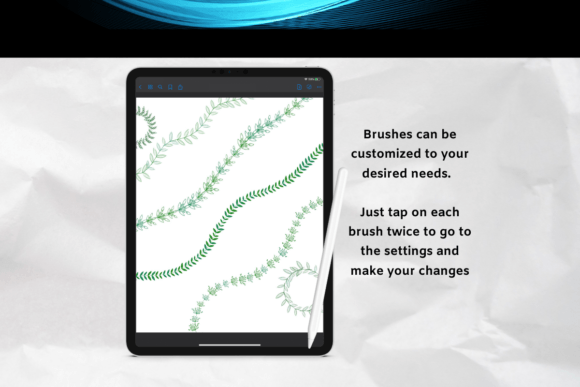
Perhaps the most practical feature is the ability to adjust the size of the pattern directly within Procreate by changing the brush size. This dynamic scaling means you can use the same brush to create a subtle, fine-grained texture in the background or a bold, large-scale motif for a focal point. For instance, you might use a small dot pattern to fill the negative space around a central character, then switch to a larger flower pattern to frame the edges of your illustration. This flexibility ensures that the patterns complement your artwork rather than overpowering it.
Enhancing Your Palette with Spring Swatches
While the brushes provide the structure and texture, color brings the artwork to life. The Easter Egg Pattern Brush for Procreate package also includes a curated selection of one spring Easter swatch palette. Color palettes are crucial for maintaining harmony in your designs, especially when working with multiple pattern layers. These swatches are specifically chosen to match the tones found in traditional Easter eggs and spring florals, ranging from soft pastels to vibrant accents.
Using a cohesive color palette alongside the pattern brushes ensures that your final piece feels unified. Instead of guessing which shades of green or pink will look best against your patterned background, you can rely on these pre-selected swatches to guide your choices. This is particularly helpful for adult creators who value efficiency and professional results, allowing them to spend less time experimenting with colors and more time refining their illustrations.
Practical Applications for Artists and Designers
The utility of the Easter Egg Pattern Brush for Procreate extends beyond simple decoration. Here are several practical ways different users can implement these tools:
- Greeting Card Design: Create stunning, textured backgrounds for Easter cards. Use the heart and dot patterns to add subtle depth behind text or main illustrations.
- Fabric and Surface Textures: If you are designing digital prints for fabric, wrapping paper, or stationery, the seamless nature of these brushes is ideal. You can tile the patterns effortlessly to create continuous designs.
- Social Media Content: Design engaging headers, story templates, or promotional posts for spring campaigns. The floral and leaf patterns add a festive touch that resonates with audiences during the holiday season.
- Children's Book Illustration: Add whimsical borders or background elements to pages without cluttering the scene. The ability to resize the pattern allows for versatile application in various layouts.
Each user approach depends on their specific goals. A graphic designer might prioritize the seamless tiling capabilities for print products, while an illustrator might focus on the resizing feature to add texture to characters' clothing or hair. Regardless of the application, the underlying benefit remains the same: increased productivity and enhanced visual quality.
Installation Guide for All Devices
To utilize the Easter Egg Pattern Brush for Procreate, you must ensure your device meets the necessary requirements. Please note that this brushset is optimized for iPad Procreate and requires version 4.0 or later. Users with older versions or devices that do not support the .brushset file format can still access the content using individual .brush files.
If you have an older iPad or are running Procreate version 4.0 or earlier, follow these steps to install the brushes manually:
- Download the folder containing the .brush files to your preferred folder on your iPad.
- Open the folder and locate the specific .brush files you wish to import.
- Tap and hold the file with your finger or Apple Pencil until a menu appears.
- Select Share from the menu options.
- If the option "Open in Procreate" does not appear immediately, click on More.
- Scroll through the list of apps, find Open in Procreate, and tap it to enable the option.
- Once imported, open your project in Procreate and click the brush icon (top right corner) to access your new tools.
Alternatively, for a streamlined installation on compatible devices, you can use the direct import method:
- Open Procreate and start a new collection or project.
- Navigate to the brush settings and select the Import option.
- Browse your downloads folder, locate the brush file, and select it.
- The brushes will be added to your library, ready for immediate use.
Maximizing Your Creative Workflow
Integrating the Easter Egg Pattern Brush for Procreate into your workflow is about more than just downloading a file; it is about adopting a smarter way to create. By leveraging these 16 seamless designs, the included spring color palette, and the flexible sizing options, you can overcome common creative bottlenecks. Whether you are a seasoned professional looking to speed up production or an enthusiast exploring digital art, these tools provide a solid foundation for beautiful, spring-inspired creations.
Remember that the best results come from experimentation. Try layering different patterns, adjusting opacity, and blending modes to see how the flowers, leaves, and hearts interact with your base layers. With the right resources, your digital canvas becomes a playground for endless possibilities, ensuring your Easter and spring projects stand out with professional polish and artistic flair.
© Let's Art ♡