Enhance Your Digital Art with Speech Bubble Stamps for Procreate
Digital illustration has revolutionized the way creators communicate ideas, turning static images into dynamic narratives. For artists, educators, and planners alike, the ability to add conversational elements quickly is a game-changer. This is where Speech Bubble Stamps for Procreate become an essential tool in your digital arsenal. These specialized brush sets allow you to instantly apply hand-drawn, doodle-style speech bubbles to your artwork without the tedious process of drawing each one from scratch. Whether you are designing a comic strip, creating a colorful planner page, or engaging children in a craft project, these stamps offer a seamless blend of creativity and efficiency.
The Challenge of Creating Consistent Doodles Digitally
One of the most common hurdles faced by digital artists and journalers is maintaining consistency while keeping a natural, hand-drawn aesthetic. Drawing a perfect speech bubble freehand can be time-consuming, especially when you need multiple variations within a single layout. Furthermore, ensuring that every bubble looks cohesive in terms of line weight and style requires significant practice. Many users find themselves stuck between the rigidity of vector shapes and the unpredictability of manual drawing.
This challenge is particularly acute for those using their iPads for bullet journaling or educational materials. When you are trying to capture a fleeting thought in a planner or design a worksheet for kids, spending ten minutes on a single graphic element disrupts your creative flow. The goal is not just to have a speech bubble, but to have one that feels organic, playful, and perfectly integrated into the rest of the composition. Without the right tools, this balance is difficult to achieve, leading to frustration or abandoned projects.
How Speech Bubble Stamps Solve Creative Bottlenecks
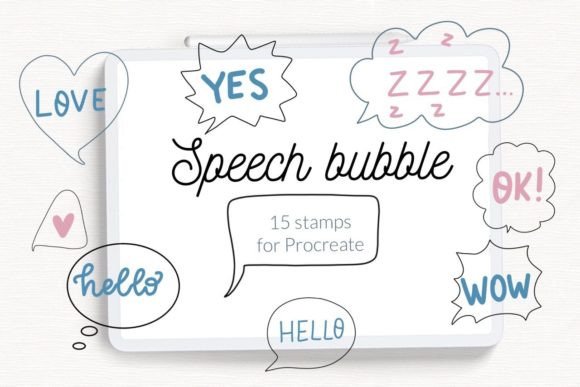
Speech Bubble Stamps for Procreate address these pain points directly by providing a library of pre-designed, high-quality graphics that function as brushes. Instead of drawing, you simply tap your screen to place a stamp. This set includes 15 unique doodle hand-drawn speech bubbles, offering a variety of shapes, sizes, and tail directions to suit different contexts. Because they are designed specifically for the iPad Procreate app, they integrate flawlessly with your existing workflow.
The primary benefit of using these stamps is the restoration of creative momentum. By removing the technical barrier of drawing complex shapes, you can focus entirely on the content of your message or the overall composition of your page. The "doodle" style ensures that even though the shapes are repeated, they retain a whimsical, human touch that feels less robotic than standard geometric shapes. This makes them ideal for projects where personality and warmth are paramount.
Practical Applications for Every User
The versatility of Speech Bubble Stamps for Procreate means they serve a wide range of users with different goals. Here is how various creators can leverage this resource:
- Bullet Journal Enthusiasts: For those who use their iPads to track habits, plan weeks, or log gratitude, these stamps add a layer of visual interest. You can use them to highlight important notes, create dialogue between daily tasks, or simply decorate empty margins. The hand-drawn aesthetic fits perfectly with the organic nature of bullet journaling.
- Comic Artists and Storytellers: Independent creators often need to produce pages quickly. These stamps provide a quick way to block out dialogue areas before refining them or to finalize rough drafts. The variety in the set allows for different emotional tones, from excited bursts to calm, flowing conversations.
- Coloring Page Creators: If you design coloring books for children or adults, adding text placeholders is crucial. Using Speech Bubble Stamps for Procreate allows you to insert outlines that are ready to be colored, saving hours of tracing work. The clean lines ensure that the final print product looks professional.
- Parents and Educators: For kids' crafts and educational worksheets, engagement is key. These doodle stamps make learning materials feel fun and approachable. Teachers can quickly create interactive storyboards or social-emotional learning cards where students fill in the bubbles with their own thoughts.
Technical Considerations and Installation Guide
To get the most out of Speech Bubble Stamps for Procreate, it is important to understand the file formats and installation process. This brush set comes as a single .brushset file containing 6 stamp brushes, which collectively house the 15 distinct doodle designs. It is designed exclusively for the iPad version of Procreate. However, compatibility depends heavily on your software version.
Note: If you are using Procreate version 4.0 or earlier, the standard .brushset file will not work. In this scenario, you must use the individual .brush files provided in the download folder. Older versions of the app require a slightly different import method to recognize the assets correctly. Below is a step-by-step guide to ensure you have your brushes ready to go, regardless of your device's age.
Installation for Procreate Version 4.0 or Earlier
If you have an older iPad or are running an outdated version of the app, follow these specific instructions to import your Speech Bubble Stamps for Procreate:
- Download the entire folder containing the .brush files to a location on your iPad, such as the Files app.
- Open the folder and locate the individual .brush files you wish to install.
- Tap and hold down on the file with your finger or Apple Pencil until a menu appears.
- Select Share from the menu options.
- In the share sheet, look for the option Open in Procreate. If you do not see it immediately, click on More.
- Scroll through the list of apps, find Procreate, and tap on it to enable the option.
- Click Open in Procreate to transfer the file.
- Once the app opens, start a new project or open an existing one. Click on the brush icon located at the top right corner of the screen.
- Navigate to the "Imported" folder to find your newly added speech bubble stamps.
Alternative Import Method via Collections
Alternatively, if you prefer managing your brushes through collections, you can use the following method which works well for organizing your workspace:
- Open Procreate and navigate to the Brush Library.
- Click on the three dots (...) next to your desired collection or create a new collection specifically for your doodles.
- Select Import from the menu.
- Browse your downloaded files, select the folder or specific .brush files, and confirm the addition.
- Your Speech Bubble Stamps for Procreate will now appear in your selected collection, ready for immediate use.
Maximizing Your Creative Workflow
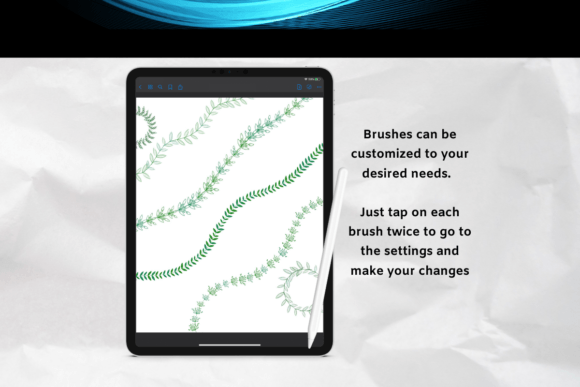
Once installed, the true power of these stamps lies in how you utilize them. While they are designed for speed, they also offer flexibility. You can adjust the opacity of the brush to create subtle background elements or keep it at 100% for bold, black-and-white outlines. Because they are stamp brushes, you can resize them dynamically before placing them on the canvas, allowing for perfect scaling whether you need a tiny whisper bubble or a massive shout-out box.
For advanced users, combining these stamps with other Procreate features like layers and blending modes can yield stunning results. Try placing a colored shape behind the stamp to create a filled-in effect, or use the selection tool to crop parts of the bubble for custom layouts. The goal is to let the tool serve your vision, not limit it. Whether you are a seasoned illustrator or a beginner looking to spice up your digital planner, Speech Bubble Stamps for Procreate provide a reliable, high-quality solution that bridges the gap between technical precision and artistic expression.
By integrating these resources into your toolkit, you eliminate the friction of repetitive drawing tasks. This shift allows you to dedicate more energy to storytelling, design composition, and the joy of creation itself. Embrace the ease of digital doodling and watch your projects come to life with vibrant, engaging conversation starters.