Evaluating Magnolia Stamps for Procreate
Digital illustration often requires a balance between creating custom assets from scratch and utilizing pre-made tools to streamline the workflow. For artists using the Procreate app on iPad, specialized brush sets have become essential components of this process. One such tool is the Magnolia Stamps for Procreate. This resource provides a collection of twenty distinct magnolia flower stamps designed to be integrated directly into digital art projects. Before integrating these tools into a creative pipeline, it is necessary to understand their specific capabilities, limitations, and how they fit into various artistic goals.
Understanding the Toolset
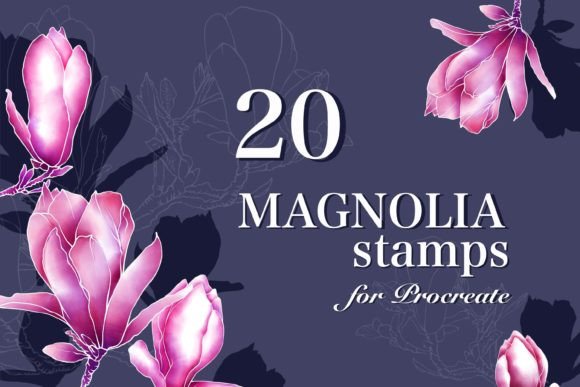
The Magnolia Stamps for Procreate is not a traditional paintbrush that creates strokes based on pressure or tilt in real-time. Instead, it functions as a stamping mechanism. When activated within the Procreate interface, each of the twenty included brushes places a pre-defined image of a magnolia flower onto the canvas. These images are static in shape but flexible in application. The primary utility of this set lies in its ability to rapidly populate a canvas with botanical elements without the need for manual drawing or tracing.
Upon installation, the user gains access to twenty variations of magnolia blooms. These can range from fully opened flowers to buds, offering a degree of variety within the single theme. The core functionality relies on the "stamp" action: tapping the screen places the image. Because these are brush settings rather than imported raster images, they inherit the properties of the active layer. This means the color of the stamp is determined by the current color picker selection, allowing for immediate customization.
Key Use Cases and Applications
Artists typically seek out resources like Magnolia Stamps for Procreate for specific types of projects where speed and consistency are valued over unique, hand-drawn variation. The most common applications include:
- Pattern Design: Creating seamless repeating patterns for textiles, wrapping paper, or digital backgrounds is significantly faster with stamps. The consistent size and shape of the magnolia flowers ensure that the pattern tiles correctly without the irregularities often found in freehand drawing.
- Digital Planner Decoration: Users who create or customize digital planners often require aesthetic elements to mark dates, holidays, or sections. A spring-themed planner benefits greatly from the inclusion of magnolia motifs, which evoke the season naturally.
- Background Texturing: Rather than serving as the focal point, these stamps can be used to create depth in the background of an illustration. By adjusting opacity and blending modes, artists can create a soft, floral backdrop that supports foreground subjects.
- Rapid Prototyping: When sketching out a composition, placing full flowers takes time. Using a stamp allows an artist to quickly visualize how floral elements interact with other parts of the design before committing to detailed rendering.
Benefits and Workflow Efficiency
The primary advantage of using this brush set is efficiency. Drawing a realistic or stylized magnolia flower from scratch requires knowledge of petal structure, shading, and perspective. Even for skilled illustrators, replicating a flower multiple times can be tedious. The Magnolia Stamps for Procreate eliminates this repetition. Once the desired color is selected, the artist can place dozens of flowers in seconds.
Furthermore, the flexibility of the color system is a significant benefit. Since the brushes work with the active color palette, an artist is not restricted to the original colors of the stamp file. A white magnolia can instantly become pink, blue, or gold simply by changing the brush color. This adaptability makes the set useful for projects requiring specific color schemes, such as brand identity work or themed illustrations.
Texture integration is another practical feature. While the base shape is fixed, the texture of the stroke can be modified by changing the brush's grain settings or applying texture layers in Procreate. This allows the flat stamp to blend more naturally with hand-painted environments, reducing the "sticker-like" appearance that sometimes plagues digital stamps.
Tradeoffs and Limitations
Despite the efficiency gains, there are tradeoffs to consider when relying on stamp-based tools. The most notable limitation is the lack of organic variation. In nature, no two flowers are identical; petals may curl differently, overlap uniquely, or show signs of weathering. A stamp set produces uniform shapes. If used excessively without modification, the artwork can appear repetitive and artificial.
Additionally, the resolution and detail of the stamp are fixed at the time of creation. If a user scales the stamp up too large, pixelation may occur depending on the quality of the source image embedded in the brush. Conversely, scaling down too much may result in a loss of definition. Artists must manage the size of the stamp carefully to maintain visual clarity.
Another constraint is platform exclusivity. As noted in the product specifications, these brushes are designed exclusively for the Procreate App on iPad. They cannot be transferred to desktop software like Adobe Photoshop or Clip Studio Paint, nor can they be used on mobile devices running different operating systems. This limits their utility for artists who work across multiple platforms.
Situational Fit: When to Choose This Set
The Magnolia Stamps for Procreate is a strong fit for specific scenarios. It is ideal for designers creating commercial patterns where consistency is a requirement. It also serves hobbyists who want to add professional-looking floral elements to their journals or planners without investing hours in learning botanical anatomy. If the project deadline is tight, or if the goal is to produce a high volume of similar assets, this tool offers a practical solution.
It is also suitable for artists who are comfortable with post-processing. An experienced user will take the stamped base and use Procreate's liquify, warp, or smudge tools to alter the shape slightly, adding the necessary organic feel while retaining the time-saving benefits of the initial stamp.
When Alternatives May Be Better
There are situations where this brush set may not be the optimal choice. If the project demands hyper-realism or highly unique, one-of-a-kind illustrations, drawing the flowers manually is superior. Hand-drawn elements capture subtle imperfections and lighting nuances that a static stamp cannot replicate.
Furthermore, if an artist works primarily on a desktop computer, this set is irrelevant due to its Procreate-only compatibility. In such cases, searching for vector-based magnolia assets or Photoshop-compatible brushes would be more appropriate. Similarly, if the project involves complex 3D modeling or animation, a 2D stamp brush will not integrate well into that workflow.
Decision-Making Insights
Before deciding to install and use Magnolia Stamps for Procreate, potential users should evaluate their specific workflow needs. Consider the following questions:
- Do I need speed or uniqueness? If the priority is rapid production of consistent elements, the stamps are valuable. If the priority is unique character in every flower, manual drawing is better.
- Am I working exclusively on iPad? Ensure your hardware aligns with the software requirements. There is no workaround for using Procreate-specific brushes on other devices.
- Can I modify the output? Are you willing to spend time warping or texturing the stamps to make them look less uniform? If not, the final result may look generic.
- Does the style match my project? Review the preview images of the twenty stamps. Do they match the level of detail and artistic style (e.g., watercolor, line art, realistic) required for your specific piece?
Ultimately, the value of this brush set lies in its ability to bridge the gap between blank canvas and finished composition. It serves as a foundational tool that accelerates the creative process, provided the user understands its constraints and applies it with an eye for natural variation. For those focused on spring-themed designs, pattern making, or planner aesthetics, it represents a functional addition to a digital toolkit, streamlining the path from concept to completion.