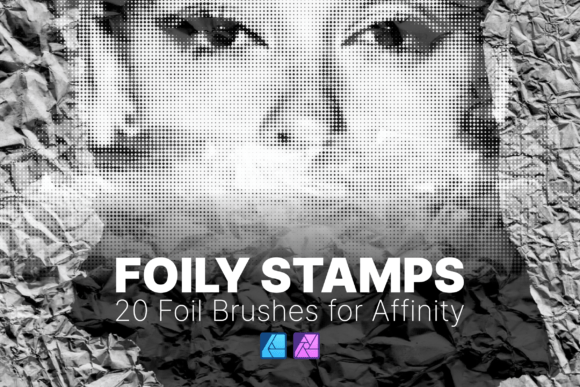
Foily Stamps - Affinity Brush Pack AD AP Review
In the realm of digital design, the texture and finish of an element often dictate its perceived value. A flat vector or a standard raster image can lack the tactile depth that makes a project feel premium. This is where specialized assets like the Foily Stamps - Affinity Brush Pack AD AP become essential tools for designers seeking to elevate their work without resorting to complex manual masking or external rendering software. This collection offers a streamlined approach to adding sophisticated metallic accents, specifically tailored for users of Affinity Designer and Affinity Photo across PC, Mac, and iPad platforms.
The core utility of this brush pack lies in its ability to simulate the look of foil stamping—a traditional print technique involving heat and pressure to apply metallic ink—within a purely digital environment. For professionals working on branding, packaging, or editorial layouts, achieving this effect manually can be time-consuming. The Foily Stamps - Affinity Brush Pack AD AP condenses this complexity into twenty meticulously crafted brushes, allowing for rapid application of high-end textures directly onto your canvas.
Technical Specifications and Format Compatibility
A primary consideration when evaluating third-party assets for the Affinity suite is file compatibility. Many generic brush packs are designed for Adobe Photoshop or Illustrator, requiring conversion or failing to load entirely. The Foily Stamps - Affinity Brush Pack AD AP addresses this by utilizing the native .affbrushes format. This ensures seamless integration with both Affinity Designer (vector-focused) and Affinity Photo (raster-focused), eliminating the friction of format conversion.
The installation process is straightforward, adhering to the standard workflow expected by experienced users. The package includes a text file with step-by-step instructions, guiding users through the import process within the Brushes panel. Once installed, these brushes appear immediately in the interface, ready for deployment. This reliability is crucial for freelancers and agencies who need to maintain a fluid workflow without troubleshooting asset compatibility issues mid-project.
Furthermore, the cross-platform support extends to the iPad version of Affinity. With the rise of mobile-first design workflows, having access to high-quality assets on a tablet is increasingly important. Whether you are sketching concepts on an iPad Pro or refining final details on a desktop, the consistency of the Foily Stamps - Affinity Brush Pack AD AP remains intact, ensuring that your creative vision translates perfectly regardless of the device.
Optimized Resolution and Scalability
One of the most significant technical advantages of this specific brush pack is the optimized resolution. Standard brushes often suffer from pixelation when scaled up, resulting in jagged edges or muddy textures that ruin the illusion of realism. The creators of the Foily Stamps - Affinity Brush Pack AD AP have upgraded the base size to 900px. This increased resolution provides a higher density of information per stroke, capturing the subtle nuances of light reflection and surface imperfection inherent in real foil stamping.
This optimization translates directly to practical usability. When working on large-format projects such as billboard designs, packaging mockups, or high-resolution web banners, scalability is non-negotiable. These brushes maintain their crispness and detail even when expanded significantly. The internal structure of the brush tips allows them to adapt to larger canvases without losing definition, providing the flexibility required for diverse project scopes. For instance, applying a gold foil accent to a small business card logo requires different precision than applying it to a full-page magazine header; the 900px foundation supports both scenarios effectively.
Workflow Integration and Creative Application
The true value of any digital asset is measured by how well it integrates into a real-world workflow. The twenty brushes included in the Foily Stamps - Affinity Brush Pack AD AP are not merely decorative; they are functional tools designed to solve specific design challenges. They are particularly effective for creating:
- Brand Logos: Adding a metallic sheen to typography or iconography to convey luxury and authority.
- Invitations and Stationery: Simulating the elegant finish of physical wedding or corporate invitations.
- Product Packaging: Visualizing how foil accents will look on boxes, bottles, or labels before sending files to print.
- Social Media Graphics: Creating eye-catching headers and promotional materials that stand out in crowded feeds.
In practice, these brushes function as a "stamp" mechanism. Rather than painting freehand, which can be unpredictable, the user applies the texture in a controlled manner. This mimics the actual mechanical process of foil stamping, where a die is pressed onto the material. This predictability is vital for professional output, ensuring that every application looks intentional and polished. The variety within the pack covers different styles of foil application, from solid blocks of color to distressed, vintage-style transfers, offering enough diversity to handle multiple projects without needing to purchase additional assets immediately.
Evaluating Quality and Long-Term Value
When assessing the quality of the Foily Stamps - Affinity Brush Pack AD AP, the focus should be on the fidelity of the simulation. High-quality foil effects rely on the interplay between highlights, shadows, and the underlying substrate. These brushes demonstrate a strong understanding of light physics, incorporating gradients and noise patterns that mimic the way metal reflects light unevenly. This attention to detail prevents the "plastic" look often associated with low-effort digital effects.
From a longevity perspective, investing in well-optimized native formats like .affbrushes is a sound strategy. As Affinity updates its software, native assets tend to remain compatible longer than those relying on scripts or plugins. The robust construction of these brushes suggests they will remain a reliable part of a designer's toolkit for years. Unlike trend-specific assets that may date quickly, the fundamental appeal of foil stamping is timeless, making this pack a versatile addition to any library.
However, it is important to manage expectations regarding limitations. While these brushes excel at simulating the *appearance* of foil, they do not replace the need for proper print preparation if the final output is physical. Designers must still ensure that the metallic colors are converted correctly for the printing press, typically using spot colors or specific CMYK profiles depending on the printer's capabilities. The brushes serve as a visualization tool to sell the concept and refine the design, but the final production steps require adherence to standard print industry protocols.
Who Benefits Most from This Tool?
The Foily Stamps - Affinity Brush Pack AD AP is particularly valuable for a specific segment of the creative community. It is ideal for:
- Freelance Graphic Designers: Those who need to deliver high-value presentations to clients quickly. The ability to show realistic foil proofs can help close deals on premium packaging or branding projects.
- Small Business Owners: Entrepreneurs creating their own marketing materials who want a professional, boutique aesthetic without hiring an external agency.
- Print Designers: Professionals who specialize in stationery, luxury goods, or event planning and need accurate visualizations of special finishes.
- Digital Illustrators: Artists looking to add texture and depth to their digital paintings without leaving their preferred software environment.
For beginners, the ease of use lowers the barrier to entry for creating sophisticated designs. Instead of learning complex layer blending modes or mask techniques, a new user can achieve a professional result with a single click. For seasoned veterans, the pack serves as a time-saving resource, reducing hours of manual texturing into minutes.
Final Assessment
The Foily Stamps - Affinity Brush Pack AD AP represents a practical solution for designers aiming to incorporate premium textures into their digital workflows. By combining native format compatibility, high-resolution scalability, and realistic visual simulation, it addresses common pain points in the creation of luxury-style graphics. While it does not eliminate the technical requirements of print production, it significantly enhances the design and presentation phase.
For anyone utilizing the Affinity ecosystem, whether on a desktop or an iPad, this collection offers a tangible boost in creative capability. It transforms the abstract concept of "foil" into a manageable, repeatable asset that fits seamlessly into modern design pipelines. In a market saturated with generic resources, the focused quality and technical optimization of this pack make it a worthwhile addition for professionals and serious hobbyists alike.