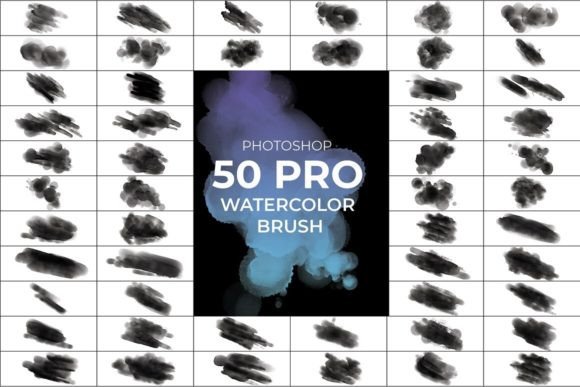
Pro Watercolor Photoshop Brush: A Strategic Asset for Visual Communication
In the competitive landscape of digital design, the ability to convey emotion and texture quickly is often the differentiator between a generic graphic and a compelling visual narrative. The Pro Watercolor Photoshop Brush set is not merely a collection of digital tools; it represents a strategic approach to efficiency and aesthetic quality. For professionals ranging from freelance illustrators to marketing directors, integrating these brushes into a workflow can significantly reduce production time while elevating the perceived value of a project. This resource offers a bridge between the organic unpredictability of traditional media and the precision required in modern digital operations.
The Strategic Value of Authentic Texture in Digital Design
One of the primary challenges in digital art is avoiding the "plastic" or overly sterile look that often plagues vector-based or standard raster graphics. Audiences today are visually sophisticated; they respond better to content that feels human-made and tactile. The Pro Watercolor Photoshop Brush addresses this by providing a library of 50 high-definition assets designed to replicate the fluid dynamics of real watercolor paint. Unlike standard soft brushes that simply blur edges, these tools simulate pigment dispersion, paper grain, and drying patterns.
From a branding perspective, incorporating these textures can position a business as more approachable and creative. For an entrepreneur launching a lifestyle brand, or an educator creating course materials, the natural flow of watercolor suggests authenticity. It signals that the creator values artistry over automation. When you apply the Pro Watercolor Photoshop Brush, you are making a deliberate decision to infuse your work with a sense of craftsmanship that resonates emotionally with viewers. This emotional connection is crucial for long-term customer retention and brand loyalty.
Technical Specifications and Workflow Efficiency
Efficiency in design is not just about speed; it is about maintaining high standards without burning out resources. The Pro Watercolor Photoshop Brush set is engineered for performance, featuring a file format compatible with all standard versions of Adobe Photoshop (ABR). Each brush is rendered at a resolution of 1500 pixels by 1500 pixels, ensuring crisp details even when scaled up for large-format prints. With a density of 300 DPI, these brushes meet professional printing standards, eliminating the need for post-processing sharpening or upscaling.
A key feature that sets this collection apart is the inclusion of the Auto Texture Edit option. This functionality allows designers to adjust the underlying texture of the stroke dynamically without needing complex layer masks or manual blending modes. Whether you require a subtle, artificial look for a clean corporate presentation or a rugged, natural look for an artistic portfolio, the settings adapt instantly. This flexibility means you can iterate on designs faster, testing different moods and styles within minutes rather than hours. For a small business owner managing multiple projects, this reduction in iteration time directly translates to increased productivity and the capacity to take on more work.
Integrating Pro Watercolor Brushes into Your Creative Strategy
To maximize the return on investment for this tool, one must move beyond random application and adopt a structured approach. Using the Pro Watercolor Photoshop Brush effectively requires understanding where organic textures add value and where they might detract from clarity. In marketing campaigns, for instance, watercolor elements can soften the harshness of data visualization or make promotional banners feel more inviting. However, in contexts requiring absolute technical precision, such as architectural blueprints or UI interface icons, these brushes should be used sparingly or avoided entirely to maintain legibility.
Consider the following scenarios where this tool provides a distinct advantage:
- Brand Storytelling: Use the brushes to create custom illustrations for blog headers or social media posts that align with a brand's narrative of creativity and growth.
- Packaging Design: Apply the natural watercolor flavor to product labels to suggest eco-friendliness, artisanal quality, or organic ingredients.
- Event Materials: Design invitations and flyers for weddings, conferences, or workshops where a personal, hand-crafted touch is expected.
- Editorial Layouts: Enhance magazine spreads or e-books with decorative borders and background washes that guide the reader's eye without overwhelming the text.
The versatility of the Pro Watercolor Photoshop Brush extends to color management. Regardless of the hue selected, the brush maintains its structural integrity and realistic behavior. This consistency allows designers to adhere strictly to brand color palettes without compromising the texture's authenticity. You can switch from a vibrant neon palette to a muted earth tone, and the brush will render the watercolor effect perfectly in both cases. This reliability is essential for agencies managing multiple client accounts with diverse visual identities.
Decision-Making: When to Deploy Organic Textures
Before integrating the Pro Watercolor Photoshop Brush into a major project, it is vital to assess the goals of the communication. If the objective is to convey stability, rigidity, or technological advancement, a hard-edged, geometric style may be more appropriate. Conversely, if the goal is to evoke feelings of calm, inspiration, or nostalgia, the organic nature of watercolor is superior. Decision-makers should view these brushes as a specific instrument in a larger orchestra, not a replacement for all other design tools.
Furthermore, consider the audience's expectations. A tech startup targeting early adopters might find the watercolor aesthetic too soft, whereas a wellness coach or a children's book author would find it indispensable. The strategic use of this tool involves aligning the visual language with the psychological profile of the target demographic. By doing so, you ensure that every pixel serves a purpose in driving engagement and conversion.
Risks of Unintentional Application
While the Pro Watercolor Photoshop Brush offers significant benefits, there are risks associated with its misuse. The most common pitfall is over-decoration. Because the brushes are so easy to use and produce beautiful results immediately, there is a temptation to apply them indiscriminately across a design. This can lead to visual clutter, where the texture competes with the core message rather than supporting it. A design that looks like a chaotic painting may fail to communicate professional competence.
Another risk lies in the assumption that the tool alone guarantees quality. The Auto Texture Edit option and dynamic settings are powerful, but they require a skilled operator to utilize effectively. Without a clear plan for composition, color theory, and hierarchy, even the highest-resolution brushes can result in amateurish output. It is crucial to remember that the brush is a vehicle for your vision, not the vision itself. Relying on the tool without developing the underlying design strategy can lead to generic-looking assets that fail to differentiate a brand in a crowded market.
Additionally, consistency can be a challenge if the brushes are used without a defined system. If one part of a website uses a heavy, wet watercolor effect and another uses a dry, sketchy stroke, the user experience becomes disjointed. To mitigate this, establish a style guide that dictates how the Pro Watercolor Photoshop Brush is applied. Define specific sizes, opacity levels, and texture densities for different elements of your brand identity. This ensures that the organic feel remains cohesive across all touchpoints.
Long-Term Benefits and Operational Impact
Adopting the Pro Watercolor Photoshop Brush into your operational workflow yields long-term benefits that extend beyond individual projects. By having a robust library of 50 high-quality brushes, teams can standardize their creative output, reducing the time spent searching for assets or creating custom textures from scratch. This standardization accelerates the production cycle, allowing businesses to respond faster to market trends and client requests.
Moreover, the ability to produce high-definition, print-ready artwork (300 DPI) internally reduces dependency on external vendors for illustration work. For small business owners and freelancers, this cost-saving measure can significantly improve profit margins. The free-hand custom capability also empowers creators to experiment and innovate, fostering a culture of continuous improvement and creative exploration within the organization.
Ultimately, the Pro Watercolor Photoshop Brush is a tool for empowerment. It democratizes access to professional-grade artistic effects, enabling individuals and teams to produce work that rivals established studios. However, its true power is unlocked only when paired with strategic thinking, clear objectives, and a disciplined approach to design. By using these brushes intentionally, you transform simple digital strokes into powerful communication assets that drive results, enhance brand perception, and deliver lasting value to your audience.