Procreate Fabric Texture Brush Pack: A Workflow Guide for Digital Fashion Illustration
Digital fashion illustration and character design often hinge on the ability to convey materiality. The difference between a flat, lifeless sketch and a compelling outfit study frequently comes down to texture. How light interacts with denim versus wool, or how yarn behaves compared to silk, defines the mood and realism of the artwork. For artists working within the Procreate ecosystem on iPad or iPad Pro, the Procreate Fabric Texture Brush Pack offers a specialized solution to this challenge. This resource is not merely a collection of strokes; it is a toolkit designed to streamline the rendering process, allowing creators to focus on design rather than manually recreating fabric patterns from scratch.
This article explores how to integrate this specific brush set into your creative workflow, examining its three distinct variations and how they apply to different stages of project execution. Whether you are a professional illustrator, a fashion designer prototyping outfits, or an educator teaching digital art techniques, understanding the practical application of these tools can significantly enhance your efficiency and output quality.
Understanding the Asset Structure and Variations
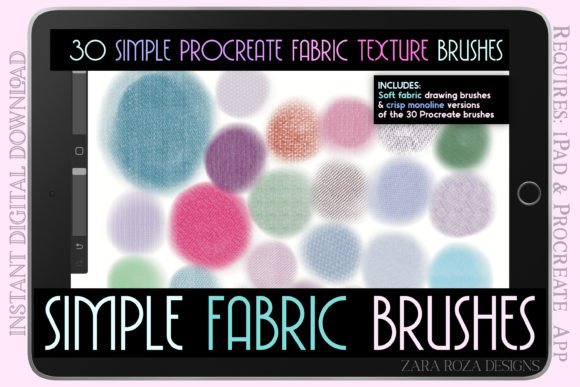
The core value of the Procreate Fabric Texture Brush Pack lies in its versatility. It contains 30 simple yet effective brushes specifically tuned for illustrating clothes, outfits, and character elements. These textures cover a wide range of materials including sewn cloth, denim, yarn, and wool knit aesthetics. However, the true utility for a professional workflow comes from the fact that these 30 textures are provided in three separate versions. Each version serves a specific function within the drawing pipeline, addressing different needs for opacity, edge control, and line smoothness.
Soft Fabric Drawing Version
The first variation is the soft edge drawing version. In a typical illustration workflow, this set is most useful during the shading and tonal development phases. Unlike hard-edged brushes that can make transitions look abrupt, these soft brushes allow for gradual blending. When rendering a sweater or a draped dress, the soft edges help simulate the way light diffuses across a fuzzy or matte surface. Artists can use these for both light and dark shading, creating depth without harsh lines. This version is particularly effective when the goal is to establish volume and form before adding fine details.
Monoline Version
The second variation is the monoline version, characterized by crisp, even edges. This set maintains a consistent level of opacity regardless of pressure sensitivity, which is crucial for technical accuracy. In fashion illustration, where pattern consistency is key, the monoline brushes ensure that every stitch or weave looks uniform. This version is ideal for defining the structure of the garment, such as the seams on a jacket or the grid-like pattern of a knit shirt. It provides a clean, graphic look that works well for stylized character art or when a more illustrative, less painterly aesthetic is desired.
Smooth Monoline Version
The third variation, the smooth monoline version, builds upon the previous set but introduces enhanced streamlining. These brushes offer superior line control, making them exceptionally stable for hand lettering and precise line art. If your workflow involves labeling designs, adding text to accessories like belts or hats, or creating intricate outlines for shoes and socks, this version reduces jitter and unwanted texture noise. It bridges the gap between texture creation and clean vector-style line work, ensuring that the final image remains polished and professional.
Integrating Textures into the Creative Process
Effective use of the Procreate Fabric Texture Brush Pack requires strategic placement within your project timeline. Rather than applying textures randomly, consider how they fit into the broader stages of planning, execution, and refinement.
Pre-Production and Planning
Before opening a new canvas, consider the materials you intend to depict. Are you designing a winter collection featuring heavy wools and knits? Or perhaps a summer line with lightweight linens and cottons? Selecting the appropriate brush variation early in the planning phase can dictate the style of your entire piece. By organizing your layers and selecting the correct .brushset file beforehand, you minimize interruptions during the creative flow. This preparation ensures that when you move to the sketching phase, the tools are ready to translate your mental image onto the screen immediately.
Execution and Layer Management
During the active drawing phase, layer management becomes critical. A recommended approach is to use the Soft Fabric Drawing version on lower layers to block in shadows and base colors. Once the volume is established, switch to the Monoline or Smooth Monoline versions on top layers to define the texture. This non-destructive workflow allows you to adjust the underlying shading without affecting the crispness of the texture lines. For example, you might sketch a denim jacket using the soft brushes for the folds, then overlay the denim texture using the monoline set to add the characteristic diagonal weave. This separation of concerns keeps the file organized and makes editing easier if a client requests changes to the fabric type later.
Refinement and Detailing
In the final stages, the Smooth Monoline version proves invaluable for adding finishing touches. Accessories such as scarves, belts, and shoes often require high-definition details that stand out against the rest of the outfit. Using the streamlined lines here ensures that small elements like buckles, buttons, or stitching remain legible at various zoom levels. Additionally, if you are incorporating typography into your fashion illustrations—such as brand names on clothing—the stability of the smooth monoline brushes prevents the text from looking shaky or unprofessional.
Compatibility and Technical Considerations
As a digital asset, the Procreate Fabric Texture Brush Pack is designed specifically for the Procreate app on iPad and iPad Pro. It is important to note that this is an instant digital download consisting of three .brushset files. There is no physical product involved, which means there are no shipping delays or packaging concerns. Upon purchase, the files can be imported directly into Procreate via the share menu or AirDrop, integrating seamlessly into your existing library.
Compatibility extends beyond just the hardware. Because these brushes are native to Procreate, they interact naturally with other features of the app, such as color dynamics, wet mix, and stabilization settings. You can customize the brush size, opacity, and flow to suit specific lighting conditions in your artwork. Furthermore, because the pack includes multiple variations of the same textures, you can maintain visual consistency across a series of images. This is particularly beneficial for designers creating lookbooks or educators producing instructional content where uniformity in style is essential.
Practical Applications Across Industries
The utility of these brushes extends beyond traditional fashion illustration. Character artists can use them to give their creations realistic clothing, adding personality through the choice of fabric. A rugged adventurer might wear a textured wool coat rendered with the soft brushes, while a futuristic cyborg could sport sleek, monoline-patterned synthetic fabrics. Marketers and small business owners selling digital art assets can also leverage these textures to create mockups for t-shirts, bags, or other apparel products, saving hours of manual detailing time.
For freelancers and publishers, the efficiency gained from using pre-made, high-quality textures translates directly to faster turnaround times. Instead of spending days developing custom brushes for a single project, the 30 included options provide a robust starting point. This allows professionals to allocate more time to composition, color theory, and storytelling. Educators can also utilize the pack to teach students about material rendering, demonstrating how different brush settings affect the perception of weight and texture in digital media.
Long-Term Usability and Organization
To maximize the long-term value of the Procreate Fabric Texture Brush Pack, organization is key. Import the three .brushset files into dedicated folders within Procreate's brush library. Label them clearly—for instance, "Fabric - Soft," "Fabric - Mono," and "Fabric - Smooth"—to ensure quick access during future projects. Over time, you may find yourself returning to specific textures repeatedly; keeping them organized prevents the frustration of searching through hundreds of unrelated brushes.
Furthermore, these brushes serve as a foundation for further customization. While they are ready to use out of the box, advanced users can duplicate and tweak individual brushes to match unique project requirements. Perhaps a specific denim texture needs a slightly rougher edge for a vintage look, or a wool texture requires a softer blend for a pastel palette. The flexibility of the Procreate engine allows you to build upon these presets, creating a personalized library that evolves alongside your skills.
Ultimately, the decision to incorporate the Procreate Fabric Texture Brush Pack into your toolkit is a decision to prioritize efficiency without sacrificing quality. By offering a structured approach to rendering complex materials, it empowers artists to execute their vision with greater speed and precision. Whether you are sketching a quick outfit idea, rendering a detailed portrait, or building a comprehensive fashion portfolio, these tools provide the necessary support to bring your digital garments to life.