Procreate Knitted: Elevating Your Digital Textiles
Digital art often struggles to capture the tactile warmth of physical materials. When you draw a sweater or a scarf on an iPad, it can easily look flat, plastic-like, or overly perfect. This is where specialized tools like Procreate Knitted become essential for artists who want their work to breathe with realism. These brushes are not just about adding lines; they are about simulating the complex interplay of light, shadow, and fiber that defines knitted fabric. For designers, illustrators, and hobbyists alike, mastering these textures can transform a standard illustration into a piece that feels tangible and inviting.
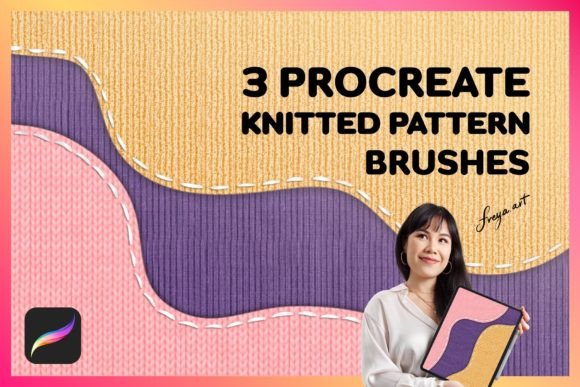
The market is flooded with generic texture packs, but finding a set that truly understands the nuances of yarn requires careful selection. A high-quality collection, such as a dedicated Set of 3 Procreate Knitted Pattern Brushes, offers more than just a single stroke. It provides a toolkit designed to handle different knitting styles, from tight cables to loose gauges. Including bonus elements like a paper texture adds another layer of depth, allowing creators to ground their digital stitches in a realistic environment. However, simply downloading these assets does not guarantee success. Many users overlook critical setup details that prevent them from achieving professional results.
Understanding the Mechanics of Digital Yarn
Before diving into specific techniques, it is vital to understand what makes a digital brush effective at mimicking knitwear. Unlike a standard marker brush, a Procreate Knitted brush relies heavily on pressure sensitivity. The Apple Pencil is the primary driver here; the amount of force you apply dictates the thickness of the stitch and the opacity of the color. If you press lightly, the brush might render a fine thread, while a heavier touch creates a bold, dense strand. This dynamic range is what separates a convincing textile simulation from a static pattern overlay.
Many beginners make the mistake of treating these brushes like traditional markers. They drag the stylus across the canvas without varying their pressure, resulting in uniform, lifeless lines that lack the organic variation found in real yarn. To avoid this, you must embrace the physicality of the tool. Think of your hand movements as if you were actually holding a knitting needle. The rhythm of your strokes should mimic the tension and release of the yarn. Without this mindful approach, even the most sophisticated brush set will fail to produce a convincing result.
Common Pitfalls in Brush Selection and Usage
One of the most frequent errors creators encounter is assuming that all digital brushes function identically across different software platforms. It is crucial to remember that Procreate brushes are made for Procreate app for iPad and do not work in other software like Adobe Photoshop. Attempting to import a .brushset file intended for Procreate into a desktop application will result in nothing but frustration and wasted time. Before purchasing any asset, verify the compatibility with your current workflow. If you primarily work on a desktop computer, these specific files will not serve your needs, regardless of how impressive the preview images look.
Another overlooked detail involves the immediate availability of the files. In the digital marketplace, speed matters. You should expect to be able to download the brushes right after you complete your purchase through an instant download system. Delays in receiving files can disrupt creative momentum. Always check the product description to ensure there is no manual approval process required before you get access to the tools. Efficient access allows you to test the brushes immediately, ensuring they meet your quality standards before integrating them into a larger project.
Maximizing Quality with Pressure and Texture
The true potential of a Set of 3 Procreate Knitted Pattern Brushes is unlocked only when combined with the correct hardware usage. Since these brushes rely on the amount of pressure used when drawing, using a finger instead of an Apple Pencil will severely limit your output. Finger input lacks the granular pressure data necessary to create the subtle variations in stitch weight. If you find your knitted patterns looking stiff or inconsistent, check your input method first. Switching to the Apple Pencil often resolves issues that seem like a flaw in the brush design itself.
Furthermore, context plays a massive role in how a texture is perceived. A knitted pattern floating in a void looks artificial. This is why including a bonus element like a Paper Texture is so valuable. By placing your knitted design over a textured background, you introduce grain and imperfection that mimic real-world photography. This technique grounds the digital element, making the viewer believe the fabric is resting on a physical surface. Ignoring the background context is a common oversight that leaves illustrations feeling unfinished and disconnected from reality.
Strategic Evaluation Before Purchase
When evaluating whether to invest in a new brush set, look beyond the marketing images. High-resolution screenshots can hide flaws in the brush engine. Instead, seek out demonstrations or video previews that show the brush in action. Watch how the artist handles curves, intersections, and shading. Does the brush maintain its integrity when drawn quickly? Does it blend naturally with other layers? These practical observations provide a much clearer picture of usability than a static gallery of finished works.
Consider also the versatility of the set. A good collection should offer variety. With three distinct patterns, you gain the ability to mix and match different knitting styles within a single artwork. This flexibility is essential for creating complex garments or detailed backgrounds. If a set only offers one repetitive pattern, its utility is limited. Ensure that the variety included matches the scope of your projects. Whether you are designing fashion sketches, creating storybook illustrations, or developing marketing materials, the breadth of options determines the long-term value of your investment.
Avoiding Costly Workflow Errors
Efficiency in digital art is often compromised by poor file management and incorrect expectations. Do not assume that buying a brush set solves all texturing problems. While tools like Procreate Knitted accelerate the process, they still require artistic skill to apply effectively. Relying solely on the brush without understanding basic shading principles can lead to flat, unappealing designs. Use the brushes as a foundation, not a crutch. Combine them with your own knowledge of light and form to achieve the best results.
Additionally, always back up your downloaded files. Instant downloads are convenient, but internet connections can be unreliable, and account issues can arise. Once you have acquired your Set of 3 Procreate Knitted Pattern Brushes, save a copy to a secure cloud storage service or an external drive. Losing access to your creative assets can halt a project entirely. Taking this simple precaution ensures that your workflow remains uninterrupted, allowing you to focus on creation rather than troubleshooting technical glitches.
Ultimately, the goal is to enhance your artistic expression without unnecessary friction. By choosing compatible tools, utilizing the correct hardware, and applying thoughtful techniques, you can master the art of digital textiles. Avoid the common traps of platform incompatibility and passive usage, and instead, engage actively with the tools provided. With the right approach, your digital knitted creations will stand out for their warmth, detail, and professional finish.