Pumpkins Botanical Harvest Stamps: Elevating Your Digital Autumn Art
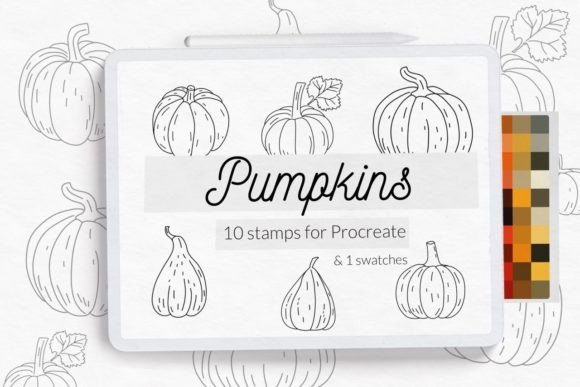
As the seasons shift, digital artists and creative planners often find themselves searching for the perfect way to capture the essence of autumn in their work. The Pumpkins Botanical Harvest Stamps collection offers a distinct solution for those using Procreate on iPad. This set includes ten hand-drawn botanical pumpkin doodle stamp brushes, meticulously crafted to add texture, character, and seasonal warmth to your digital canvas. Whether you are designing a bullet journal layout, creating coloring pages for kids, or crafting assets for a small business, these stamps provide a reliable foundation for high-quality illustrations without the need for hours of manual sketching.
Understanding the Value of Hand-Drawn Doodle Brushes
The appeal of the Pumpkins Botanical Harvest Stamps lies in their versatility and artistic integrity. Unlike generic clip art that often looks flat or overused, these brushes are designed with the nuance of real pencil strokes and ink lines. Each of the ten included stamps features a different pumpkin variety, ranging from classic round shapes to elongated heirlooms, all rendered with a botanical aesthetic. This variety is crucial for creators who want to avoid visual repetition in their projects. When used in a planner or a coloring book page, these elements bring a sense of organic flow that pre-made vector graphics frequently lack.
However, the utility of this brushset extends beyond simple decoration. For educators and craft enthusiasts, these stamps serve as excellent templates for teaching design principles or engaging children in digital coloring activities. The clean lines of the doodles make them ideal for outlining, while the textured feel adds depth when layered with color. Yet, many users overlook the specific technical requirements needed to utilize these tools effectively, leading to frustration before they even begin creating.
Common Pitfalls When Installing Procreate Brushsets
One of the most frequent mistakes creators make is assuming that all digital brush files work the same way across every version of an app. The Pumpkins Botanical Harvest Stamps are optimized for modern versions of Procreate, but compatibility issues can arise if you are using an older device or software version. A critical detail often missed is that this brushset is not available for Procreate version 4.0 or earlier. Attempting to force these files onto an outdated system will result in installation errors or missing textures, wasting valuable time and disrupting your creative workflow.
Another common misunderstanding involves the file format itself. Users sometimes download a folder expecting a single file to magically appear in their gallery. In reality, the process requires a specific interaction with the iPad's file management system. If you simply download the zip file and do nothing else, the brushes will remain inaccessible. This oversight can lead to the false conclusion that the product is defective, when in fact, the user has simply skipped the import steps. Understanding the distinction between a `.brush` file and a `.brushset` file is also vital; while both function similarly, knowing which one you have determines how you organize your library within the app.
Avoiding Compatibility Issues Before You Buy
To ensure a smooth experience, you must verify your Procreate version before purchasing or downloading. Open your Procreate app, tap the wrench icon (Actions), and check the version number at the bottom. If you are running version 4.0 or anything lower, you will need to update your app via the App Store or upgrade your hardware. There is no workaround for this limitation because newer brush engines rely on code structures that older versions cannot interpret. Ignoring this requirement will inevitably lead to a poor user experience, where the beautiful botanical details of the pumpkins fail to render correctly.
Furthermore, consider the storage space on your iPad. While a single brushset is small, accumulating dozens of large sets can eventually slow down your device. It is wise to manage your digital assets by archiving unused brushes rather than deleting them immediately. This approach keeps your workspace organized and ensures that when you return to the Pumpkins Botanical Harvest Stamps for a future project, they are ready to use without needing to re-download everything.
Step-by-Step Installation Guide for Seamless Integration
Installing the Pumpkins Botanical Harvest Stamps correctly is straightforward if you follow the proper protocol. For users with standard setups, the process is intuitive, but for those with older iPads or specific file configurations, a more manual approach is necessary. Below are the precise steps to ensure your brushes appear exactly where you expect them.
If you are using an older iPad or Procreate version 4.0 or earlier, you may need to use the individual `.brush` file method rather than the bulk `.brushset` import. Here is the correct procedure:
- Download the Folder: Save the downloaded folder containing the `.brush` files directly to your "Files" app on your iPad.
- Navigate to the File: Open the Files app, locate your download folder, and tap on the specific `.brush` file you wish to install.
- Initiate the Share Menu: Tap and hold the file with your finger or Apple Pencil until the context menu appears.
- Select Share: Choose "Share" from the options presented.
- Open in Procreate: Look for the "Open in Procreate" option. If it is missing, tap "More," scroll through the list, enable the toggle for Procreate, and then select it.
- Verify Installation: Once opened, launch your project in Procreate. Click the brush icon in the top right corner to confirm the new stamp has been added to your library.
Alternatively, for a quicker installation on compatible devices, you can use the direct import method:
- Open Procreate and create a new collection or navigate to your existing brush library.
- Tap the "+" icon to add a new brush or select "Import."
- Browse your Files app, locate the downloaded folder, and select the brush file.
- Confirm the addition, and the brush will instantly populate your palette.
Maximizing Creative Output with Bonus Palettes
A significant advantage of this collection is the inclusion of a bonus Pumpkin color palette swatches specifically designed for Procreate. Many artists make the mistake of choosing colors arbitrarily, resulting in designs that clash or lack cohesion. By utilizing the provided swatches, you align your artwork with a proven color theory that complements the hand-drawn style of the stamps. These palettes range from deep burnt oranges to muted sage greens, capturing the authentic tones of a harvest season.
Using these swatches alongside the Pumpkins Botanical Harvest Stamps creates a harmonious visual language. For instance, when creating a coloring page for kids, pre-selecting these colors ensures that the final product looks professional and inviting. For marketers or bloggers creating social media content, consistency in color and line weight builds brand recognition. The combination of the botanical stamps and the curated palette eliminates the guesswork, allowing you to focus on composition and storytelling rather than struggling with color selection.
Final Considerations for Digital Creators
Before integrating the Pumpkins Botanical Harvest Stamps into your workflow, take a moment to review your project goals. Are you looking for quick embellishments for a personal journal, or do you need scalable assets for commercial products? Understanding your end goal helps you apply the brushes more effectively. Remember that while these stamps save time, they are tools, not replacements for creativity. Experiment with opacity, blending modes, and layering techniques to make the botanical elements feel unique to your specific project.
By avoiding common installation errors, verifying your software version, and leveraging the included color resources, you can fully unlock the potential of this brushset. The result is a streamlined creative process that produces high-quality, autumn-themed artwork with minimal friction. Whether you are a seasoned professional or a hobbyist just starting out, these botanical pumpkins offer a reliable and beautiful way to celebrate the harvest season in your digital creations.