Mastering Procreate Water: The Ultimate Fluid Brush
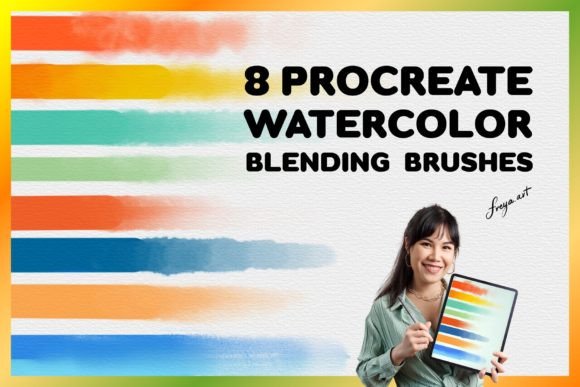
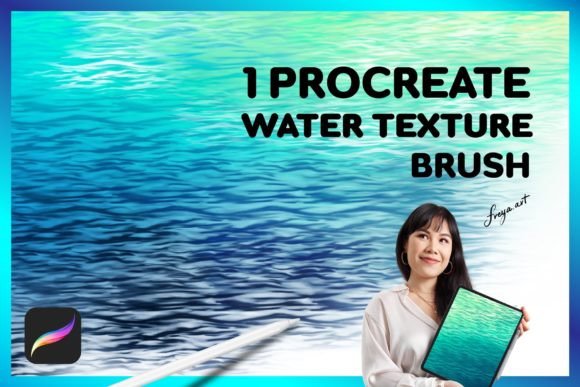
Digital artists often hit a wall when trying to replicate the organic, unpredictable flow of real water on a screen. Standard brushes feel too rigid, lacking the subtle gradients and fluid dynamics that make water paintings come alive. This is where specialized tools like Procreate Water become essential for anyone looking to bridge the gap between digital precision and natural texture. By integrating a dedicated water texture brush with a complementary paper texture, you unlock a workflow that mimics traditional media while retaining the flexibility of the iPad.
The magic of these brushes lies in their ability to respond to the physical input of your hand. When paired with an Apple Pencil, the pressure sensitivity allows you to control the opacity, size, and flow of the virtual liquid instantly. A light tap creates a delicate mist or a dry wash, while firm pressure releases a heavy, saturated pool of color. This tactile feedback is crucial for maintaining the illusion of depth and volume in your artwork.
Why Specialized Textures Matter in Digital Painting
Many creators assume that any soft-edged brush can simulate water. However, true realism requires more than just blending; it demands interaction. The Procreate Water set is engineered to handle complex layering techniques that standard brushes struggle with. Unlike generic smudge tools, these brushes are designed to hold "wetness" on the canvas, allowing colors to bleed into one another naturally before settling.
The inclusion of a bonus paper texture is equally vital. In traditional art, the tooth of the paper catches pigment, creating granulation and breaking up smooth gradients. Digitally, this texture adds grit and character, preventing the artwork from looking overly polished or sterile. When you combine the fluid dynamics of the water brush with the resistance of the paper texture, you achieve a visual richness that resonates with viewers on a subconscious level. It transforms a flat digital image into something that feels tangible and authentic.
Key Characteristics of High-Quality Water Brushes
To evaluate whether a brush pack meets professional standards, look for specific technical features. The best Procreate Water brushes utilize advanced grain settings and wet mix algorithms. These features allow the brush to react dynamically as you move across the canvas. For instance, if you slow down your stroke, the brush should deposit more pigment, simulating the way real water pools on a surface. Conversely, fast strokes should leave lighter, streakier marks.
Another critical characteristic is the ability to manage edge hardness. Real water rarely has perfectly sharp lines; instead, it diffuses softly at the boundaries. A high-quality water brush automatically adjusts its edge softness based on the amount of paint currently loaded on the brush tip. This mimics the drying process of watercolor, where edges become harder as the medium dries. Furthermore, the integration of the paper texture ensures that every stroke interacts with the underlying "surface," adding a layer of complexity that elevates the final piece.
Practical Applications Across Creative Industries
The versatility of these tools extends far beyond personal hobby projects. Professionals across various sectors leverage Procreate Water to enhance their output efficiency and aesthetic appeal. Let's explore how different roles utilize these assets in real-world scenarios.
- Illustrators and Concept Artists: Character designers use water textures to create atmospheric backgrounds quickly. Instead of spending hours painting skies or landscapes with hard brushes, they can lay down broad, fluid washes that suggest depth and mood instantly. This speeds up the ideation phase significantly.
- Book Publishers and Editors: Children's book illustrators rely heavily on the soft, inviting nature of watercolor effects. The combination of the water brush and paper texture provides a classic, storybook aesthetic that appeals to parents and educators alike, making the content feel warm and approachable.
- Marketing and Branding Agencies: Modern branding often seeks an "organic" feel to stand out against sleek, corporate designs. Marketers use these brushes to create unique social media graphics, packaging mockups, and ad creatives that convey authenticity and craftsmanship.
- Educators and Tutors: Art teachers use these digital tools to demonstrate watercolor techniques without the mess of actual paints. Students can experiment with color mixing and wet-on-wet techniques repeatedly, learning the principles of fluid dynamics without wasting materials.
Enhancing Productivity and User Experience
Efficiency is a major driver for professionals adopting these digital assets. Traditional watercolor requires drying time, setup, and cleanup. With Procreate Water, the entire process is instantaneous. You can switch between wet and dry states with a simple toggle or pressure adjustment. This immediacy allows for rapid iteration, enabling artists to try multiple compositions in the time it would take to paint a single study traditionally.
Moreover, the user experience is streamlined by the seamless integration of the paper texture. There is no need to manually overlay noise or grain layers; the texture is baked into the brush engine. This reduces the number of steps in your workflow, minimizing friction and keeping you in the creative zone. For freelancers working under tight deadlines, this time-saving factor can be the difference between meeting a deadline and missing it.
Strategic Implementation and Best Practices
While the technology is powerful, getting the most out of it requires a strategic approach. Simply downloading the brushes isn't enough; you must understand how to manipulate them within the Procreate environment. Start by adjusting the brush settings to match your specific style. If you prefer a more controlled look, reduce the flow rate. If you want chaotic, expressive results, increase the scatter and rotation settings.
It is also important to consider the layer structure of your project. For the most realistic water effects, work on separate layers for your initial washes and your detailed linework. Use the water brush on the bottom layers to establish tone and atmosphere, then switch to finer brushes on top layers for details. This non-destructive workflow allows you to adjust the intensity of the water effect later without ruining the intricate details you've added.
Remember that these brushes are optimized for the Apple Pencil. While you can use your finger or other styluses, the full range of motion and pressure sensitivity is only available with the official Apple tool. Ensure your iPad settings are calibrated correctly to maximize the responsiveness of the brush. A well-calibrated device ensures that the subtle nuances of your hand movements translate accurately to the screen.
Evaluating Your Workflow
When integrating new tools like Procreate Water into your routine, take time to test them in isolation before applying them to client work. Create a series of swatches to see how the brush behaves with different colors and opacities. Observe how the paper texture interacts with dark versus light pigments. Understanding these variables will help you predict outcomes and avoid surprises during critical projects.
Additionally, keep in mind that these brushes are exclusive to the Procreate app on iPad. They cannot be transferred to desktop software like Adobe Photoshop. This limitation reinforces the importance of having a robust mobile workflow. If your business relies on cross-platform compatibility, ensure that your final export formats (such as PNG or PSD) maintain the quality achieved through these specialized brushes.
Ultimately, the value of Procreate Water lies in its ability to democratize high-end artistic techniques. It puts the power of traditional watercolor into the hands of digital creators, allowing them to produce stunning, emotive work with unprecedented speed and control. Whether you are an entrepreneur building a brand, an educator teaching the next generation, or a freelancer delivering commercial art, mastering these tools can significantly elevate the quality and impact of your visual communication.