Unlock Creativity with Mandala Stampbrush for Procreate
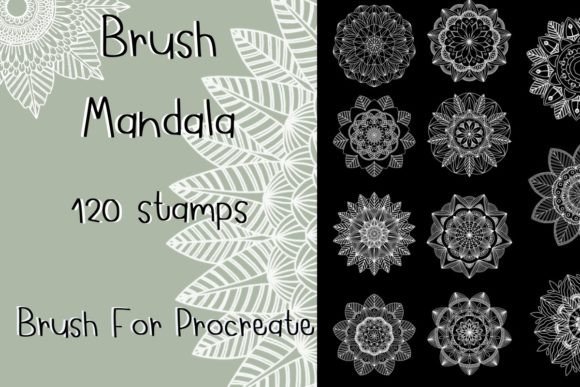
Digital art often feels like a race against the blank canvas. You want to create intricate patterns, but drawing every single curve and petal by hand can consume hours of your day. This is where the Mandala Stampbrush for Procreate changes the workflow entirely. It transforms complex geometric designs into instant assets, allowing you to focus on composition, color theory, and overall design rather than getting lost in the minutiae of repetitive line work. With a collection like the 120-piece set, you gain immediate access to a library of boho-inspired motifs that serve as the perfect foundation for everything from tattoo sketches to social media graphics.
The Power of Instant Intricacy
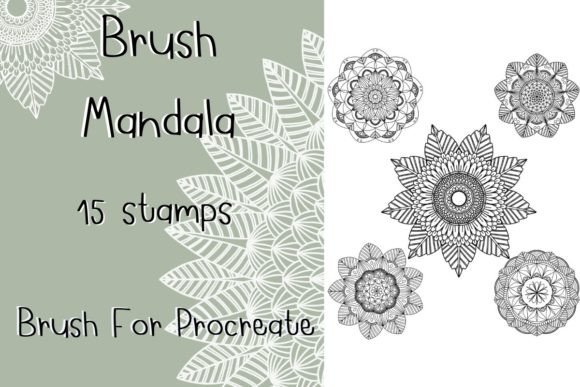
The core appeal of these tools lies in their efficiency without sacrificing quality. When you download a set of Procreate Brush Stamp Mandalas, you are essentially acquiring a toolkit of pre-rendered vector-like stamps. Unlike traditional brushes that require pressure sensitivity to form a shape, stamp brushes place a complete image onto your canvas with a single tap. The beauty of the 120-brush set is the sheer variety it offers. From small, delicate accents to large, dominant centerpieces, each brush captures the essence of mandala art—symmetry, repetition, and spiritual geometry.
What makes this specific tool interesting is its adaptability. While they are called "stamps," they are not static images locked in time. Because they function within the Procreate engine, you retain full control over their appearance. You can scale them up to fill an entire iPad screen or shrink them down to act as texture overlays. You can adjust the opacity to create watercolor washes or layer multiple stamps to build depth. This flexibility means the Mandala Stampbrush for Procreate is not just a shortcut; it is a versatile instrument for digital painting.
Practical Applications for Designers and Creators
For professionals and hobbyists alike, the applications extend far beyond simple doodling. Here is how different creators can leverage these brushes to meet specific goals:
- Tattoo Artists and Sketchers: Tattooing requires precise planning. Using Procreate mandala stamps allows artists to quickly mock up sleeve designs, back pieces, or wrist cuffs. You can arrange the stamps to visualize flow and symmetry before ever touching a client's skin. The ability to resize ensures that the design fits the anatomy perfectly.
- Graphic Designers and Marketers: In the world of branding, especially for wellness, yoga, or bohemian lifestyle brands, these stamps are invaluable. They can be used to create unique backgrounds for Instagram posts, story templates, or even packaging designs. By changing the color of the stamp to match a brand palette, you create cohesive marketing materials in minutes.
- Pattern Makers and Textile Designers: Creating seamless patterns is notoriously difficult. However, by using the grid system in Procreate alongside these stamps, you can rapidly prototype fabric prints, wallpaper designs, or wrapping paper. The variety in the 120-set ensures that no two patterns look identical.
- Journaling and Scrapbooking Enthusiasts: Digital planners and bullet journals benefit immensely from decorative elements. These stamps add a touch of elegance to headers, page borders, and focal points without requiring advanced drawing skills.
Mastering the Boho Aesthetic
The term "boho" has become synonymous with free-spirited, eclectic, and nature-inspired design. The procreate boho stamp brushes in this set are curated specifically to capture this vibe. They often feature organic lines, floral elements, and celestial shapes that blend seamlessly with modern minimalism or vintage aesthetics. To truly harness the power of procreate boho design, consider how you layer these elements.
A common mistake is to simply paste a large stamp in the center of the canvas and call it a day. To achieve a professional look, treat the stamps as building blocks. Start with a large central mandala, then use smaller stamps to frame it. Vary the colors slightly; perhaps use a deep indigo for the main piece and a soft gold for the surrounding accents. This creates visual hierarchy and guides the viewer's eye through the composition. Remember, the goal is to create a harmonious whole, not just a collection of pretty shapes.
Techniques for Consistent Results
To keep your results clear and organized, follow a few practical guidelines when working with Procreate Brushes:
- Layer Management: Always place your stamps on separate layers. This allows you to move, hide, or adjust the blending mode of individual elements without affecting the rest of your artwork. If you need to change the background later, you won't have to redraw the mandalas.
- Color Harmony: Use the Color Drop feature in Procreate to instantly change the hue of a stamp. Stick to a limited color palette—three to four colors maximum—to maintain a sophisticated look. Overusing colors can make the design feel chaotic.
- Scaling with Purpose: While you can resize these mandala stamp brushes freely, be mindful of resolution. If you are designing for print, ensure your canvas size is high enough (300 DPI) so that scaling up a small stamp doesn't result in pixelation.
- Blending Modes: Experiment with blending modes like "Multiply" or "Overlay." These settings allow the stamp to interact with the background texture, making it look less like a sticker and more like part of the painting itself.
Adapting to Different Platforms and Audiences
The versatility of the Mandala Stampbrush for Procreate also lies in its portability across different media. Whether you are creating content for TikTok, Pinterest, or a printed zine, the underlying assets remain the same. For social media, you might crop the design tightly around a single stamp to create a minimalist quote graphic. For a blog post header, you could stretch a row of smaller stamps horizontally to create a banner.
Educators and workshop leaders can also utilize these brushes to teach design principles. Students can learn about radial symmetry, balance, and negative space by rearranging the pre-made stamps. It removes the barrier of entry for those who struggle with freehand drawing, allowing them to focus on the theory of design. Entrepreneurs selling digital products can use these brushes to create mockups for their own merchandise, such as t-shirts or tote bags, ensuring their product listings look polished and professional.
Technical Requirements and Setup
To get started, ensure your setup meets the necessary criteria. These brushes are exclusive to the Procreate app and will not work on other platforms. You will need an iPad Pro or any compatible iPad model running Procreate Version 5.0 or higher. While an Apple Pencil is optional, it significantly enhances the experience, allowing for smoother placement and easier adjustments. Once imported, the brushes appear in your brush library under a custom category, ready for immediate use.
Remember, technology is just a tool. The creativity comes from how you apply it. The Procreate Brush Stamp collection is designed to spark ideas, not replace them. By combining these powerful stamps with your own artistic vision, you can produce work that is both efficient and deeply personal. Whether you are sketching a tattoo design for a client or decorating a digital journal for yourself, the possibilities are as vast as your imagination.